Assignment Goals
The primary goals of this assignment are:
- Extend the core Unreal Engine code.
- Get experience using code as examples.
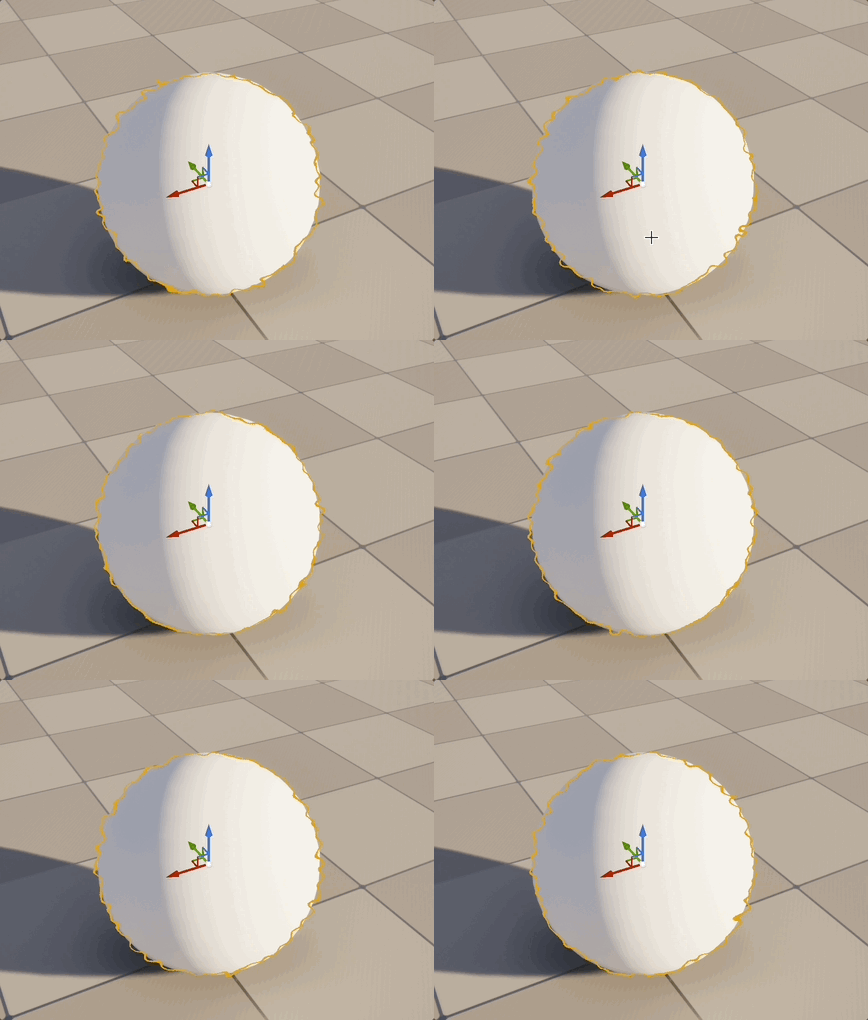
For this assignment, you'll be modifying the look of the editor selection outline to have an animated scribble look. The selection outline is defined in the PostProcessSelectionOutline files. C++ post-processing passes (like this one) are part of the "Renderer" module, so you will be modifying its C++ and shader code.
Details
We will add a scribble appearance to the outline by adding Perlin noise to the pixel location before doing the outline computations. As a result, each pixel will actually be doing the outline computation for a nearby point, offset from its location. The noise function takes three dimensional input, so you can use a scaled version of the original X/Y pixel position for two dimensions, and RealTime for the third to get an effect that changes somewhat smoothly over time.
In the selection outline shader code, the pixel position is initially computed as a floating point value before being cast to int. You'll want to add your noise while it is still a float. You'll add four new console variables (CVars) to control the look of the effect. One integer variable for the selection line width in pixels, one float to scale the X/Y coordinates before passing into the noise function, another float to scale the time to control the speed of the animation, and a final one to scale the amplitude of the noise output. For reference, at least for my code, the sample image used a line width of 2, X/Y scale of 50, speed of 2, and amplitude of 0.005.
Test scene
- Add some objects to your assn6 scene to use for selection testing.
- Since Renderer is a core module, you may have to re-build from your IDE rather than use the Module panel recompile button for many changes. Even so, changes restricted to just this module should compile relatively quickly to get back into this assn6 project.
- Be very careful not to accidentally save any edits to other widely used header files while working on this assignment. If you do, even if you undo and re-save or use "git restore" to throw away your changes, you'll still likely have to wait through a long engine rebuild of anything that depends directly or indirectly on the changed header.
Discovery
- Find the selection outline post-processing code files and read through them to get an idea of how they work.
- Take notes about what you learn or hypothesize, either as comments in the files or in your assn6.txt file. (I'll want to see this!)
- As you go through the assignment, look for examples in the selection outline or other post processing files in the same directory.
Parameters
- Create CVars to control the width of the lines, size of the scribbles, animation speed, and amount of scribble.
- Follow the example from other parameters to pass their values into the shader.
Shader
- Modify the selection outline shader to add the scribble effect.
- Use the first two vector noise output components from JacobianSimplex_ALU (called J[0].w and J[1].w in the comment where that function is declared)
- You can recompile global shaders like this using the "RecompileShaders changed" console command.
- Unlike material shader code, shader compile errors in built-in shaders like this one will crash the engine unless you set r.ShaderDevelopmentMode.
- If the engine does crash on a shader error, you can still look in the Visual Studio Output log for the shader error messages to potentially fix the error.
- Until you fix it, a global shader error can prevent the engine from getting to the point where you can set r.ShaderDevelopmentMode in the editor console. To set it at launch, edit Engine/Config/ConsoleVariables.ini
Submission
For full credit, you must commit multiple times during your development. Be sure to commit the changes to the Engine files as well!
Add an assn6.txt. This time, this should include any notes about how you think the selection process works (or tell me which files to check for notes in comments), as well as the usual statement about what works and what doesn't, and anything else you think we should know for grading.
Include a link to a video of your scribble selection in action, showing both the selection effect and a couple of changes to the CVar parameters.
Push to your repository, and tag your final commit with an assn6 tag (note that is assn6, not assn6b, since I will use this tag when grading both 6a and 6b).