Before you start
This assignment builds on the previous one. If yours worked, I strongly recommend using your own code as a starting point for this assignment. If you were not able to get your tree generation working, you can use a single cylinder or even sphere in place of the full tree. Be sure to do all of your work for this assignment in the "GLapp" directory of your repository so we can find it (we will be able to use your assn3 tag to find your previous project solution in your git history for grading).
The Assignment
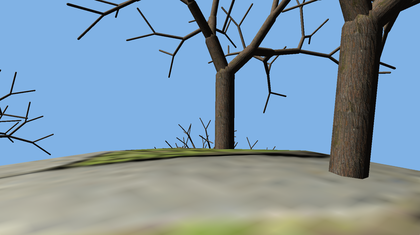 For this assignment, you will plant L-system trees randomly over the surface of a small spherical planet, then modify the GLapp program to interactively walk over the surface with a first-person view using typical game keyboard and mouse controls.
Objects: For the sphere geometry, you can use the provided Sphere class, with the movement code removed. For the tree placement, given pairs of random floats, $(u_i, v_i)$ each in the range [0,1), you can generate a set of points uniformly distributed on the unit sphere:
$$z_i=2 v_i-1\\x_i=\sqrt{1-z_i^2} \cos{2\pi u_i}\\y_i=\sqrt{1-z_i^2} \sin{2\pi u_i}$$Motion: We will use the classic 'wasd' controls. Holding 'w' should move you in whatever direction you are currently facing, 's' should move you backwards, and 'a' and 'd' should strafe left and right. Your view up vector should be the vector from the center of the sphere to your current position. Moving the mouse left and right should pan your view horizontally and change your current heading. Moving the mouse up and down should tilt your view, but not affect the heading. All motions should be computed in terms of velocities (units moved per second), then scaled by the elapsed time (dTime) between frames. Note this multiplication of a velocity (in m/s) times a time (in s) results in a distance (in m).
Constraints: You should ensure the player remains a fixed distance above the planet surface by normalizing the vector from the planet center to the player's position, then scaling by the planet radius plus the player height. Ensure the forward and right vectors also align with the sphere surface by orthonormalizing them against the current up vector. You should do this every frame to ensure the player and player's motion remain constrained to the surface of the planet.
Collisions: As the player navigates over the surface, do not allow their position to move too close to any of the trees. The easiest way to do this is to have a list of tree positions and compute the distance between the proposed position update and the tree position. If it is too close, reject the position update.
634 only
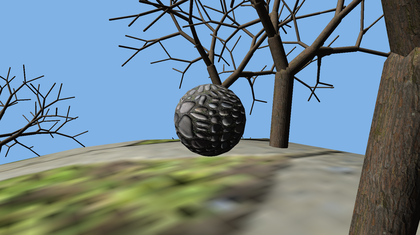 Provide an option for a third-person view, where you render the player walking over the terrain as a small version of the sphere. Toggle between first-person and third-person view with the 'T' key. Note that, since we are only drawing front facing triangles, when in first-person mode you can just place the viewpoint inside the sphere, which will be invisible since all the faces will be back facing.
Remember that a third-person view is created by combining a first person transformation with a translation of the view back away from the player, so you can control which viewing method you use by setting up a third-person view and setting the camera distance to zero in first-person mode.
Extra Credit
There are three extra credit options at 5 points each, for a total of 15 points of possible extra credit if you do all three. You are only eligible for extra credit if you submit on the original due date.
Add a debugging mode with view sufficiently far away from the planet to see its shape. Include some indication of player location (e.g. with a small sphere as in the grad version). If you plan to do this, I'd do it early to help you debug your primary assignment.
Include a jump when the player presses the space bar. Retain the current horizontal velocity, but add a vertical component. During the jump, disable any motion or jump input. Compute a gravity vector opposite the up vector each frame, scale by dTime, and add it to the velocity. Continue until the player's position is at or below the planet surface. At that point, turn motion keys back on and snap back to the planet surface.
For up to 5 points, use a single instanced draw for all of the trees. You will have a single copy of the tree vertex arrays and index array, and override Object::draw() to use glDrawElementsInstanced.
To position each tree, you will need an array of positions or matrices. Index into the array in the vertex shader using gl_InstanceID, or use glVertexAttribDivisor to get OpenGL to step through the array automatically. You will need to do some online research to figure out how to do this. Be sure to document your sources in your assn4.txt
Tips
It's easiest to get reasonable behavior if you start with realistic physical values: People are about 2 m tall. Normal walking speed is 15-20 minutes per mile, or 1.3-1.8 m/s. Gravity is 9.8 m/s2. It's fine to change from realistic values, for example if you want the player to run a bit faster or jump a little higher, but it's a bit easier if you start with mostly realistic values, and intentionally modify from there.
You can extract the position and heading from the transformation matrices, or keep track of them as separate vectors and angles, or some combination of those. Think before you code about which direction each transformation is going, and where the origin and axes are before and after that transformation.
What to turn in
Do your development in the GLapp directory so we can find it. Also include an assn4.txt file at the top level of your repository telling us about your assignment. Tell us what works, and what does not. Also tell us what (if any) help you received from books, web sites, or people other than the instructor and TA. Especially if you do the third extra credit, I expect that you will have to use external sources to discover the correct set of OpenGL calls to use.
Turn in this assignment electronically by pushing your source code to your class git repository by 11:59 PM on the day of the deadline and tagging the commit assn4. See the assn0 project description if you accidentally tag the wrong commit and need to retag.
You must make multiple commits along the way with useful checkin messages. We will be looking at your development process, so a complete and perfectly working assignment submitted in a single checkin one minute before the deadline will NOT get full credit. Individual checkins of complete files one at a time will not count as incremental commits. Do be sure to check in all of your source code, but no build files, log files, generated images, zip files, libraries, or other non-code content.
If you attempt any extra credit, you must describe it in your assn4.txt. Do not expect the TA to scour your commit messages or code to figure out you did an extra credit and grade it for you.