The Assignment
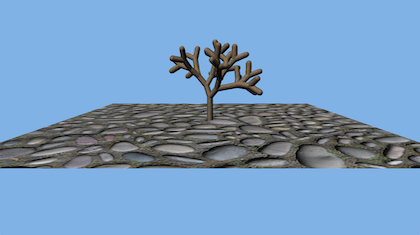
For this assignment, you will be modifying a provided sample OpenGL application to model an L-system tree in the middle of a flat plane.
Provided Code
To get you started, a simple OpenGL application has been committed to the GLapp directory in your git repository. This application renders two objects: a textured plane with a sphere floating over it. It uses two external libraries that should work on Windows, Mac, and Linux: GLFW provides window creation and input handling; and GLEW manages the OpenGL functions and extensions.
For Windows, I have precompiled both libraries into a zip file, together with a batch script that will set the environment variables necessary for CMake to be able to find them. To use these on Windows, you must 1) download the GLlibs.zip file, 2) extract the contents, 3) run the envset.bat script, 4) restart CMake, then 5) use CMake to generate the GLapp.slnx file. The GLlibs files do not need to be copied into your git repository (and should not be!). It is fine to leave the GLlibs files in your Downloads folder, desktop, or wherever else is convenient. If you move them, you should re-run the envset.bat script in the new location, then re-run CMake to update your visual studio solution file.
For Linux, you should be able to find all three packages in the package manager for your Linux distribution. If CMake does not find any of the three packages, you can set the GLEWDIR and/or GLFWDIR environment variables before running CMake to help it know where to look.
On Mac, I recommend installing them with the homebrew package manager. The provided CMake files will look in the standard homebrew installation locations.
You will need a computer capable of running an interactive application with at least OpenGL 3.1. If yours will not work, we have a limited number Windows PCs in the GAIM lab (ENG 005) that you can use.
L-system
You should read a text file to define the L-system. The first line should give a starting symbol or string. The remaining lines should define production rules for each non-terminal, so "A=A[+B]" would be a rule to replace A with A[+B]. In your L-system grammar, letters can be be terminals or non-terminals, numbers and symbols should all be terminals, and "=" will separate a non-terminal from the replacement string in replacement rules.
Symbols in your grammar should have the following geometric meaning:
- 'A'–'Z': add a branch segment and translate to the end (so subsequent rotations will be around the tip of the branch).
- '^': a 103° rotation around the current branch axis (4π/7 radians)
- "+" and "-": +30° and –30° rotations around the branch x axis
- "[" and "]": push and pop the transformation stack
- 'a'–'z': additional non-branch terminals or non-terminals
You should intially render the start string, but include keyboard controls: '+' to increase or '-' to decrease the number of generations of substitution to create your tree.
I suggest that you start by reading the file, doing text substitution of the L-system, and printing the results. You can confirm the L-system evolution that way for 1-2 levels before you start rendering.

Rendering
Make your own Tree class, derived from Object. Replace the Sphere object in the sample scene with a single tree in the middle of the plane, large enough to see but small enough to fit on screen.
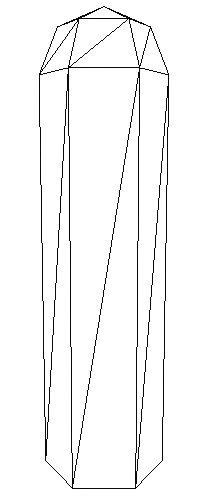
Your branch segments should be triangulated cylinders with a hemispherical cap on one end (example on the right — refer to the Sphere code as a guide for how to construct the vertex and index arrays). You can choose any number of triangles around the circumference of your branch, more will look smoother while fewer will be faster. Six to eight is probably a good compromise. This number can be hard-coded in your application. Use the "bark" textures for the cylinder and cap.
You will need to implement your own matrix stack during L-system construction. Apply the transformations in the matrix stack to the vertices and normals of each cylinder in CPU code, so the entire tree can be drawn from one vertex and index array in one draw
634 only
Add a different shape for lower case letters, for example leaves or flowers. Provide at least one L-system that uses it.
Extra Credit
There are three extra credit options at 5 points each, for a total of 15 points of possible extra credit if you do all three. You are only eligible for extra credit if you submit on the original due date.
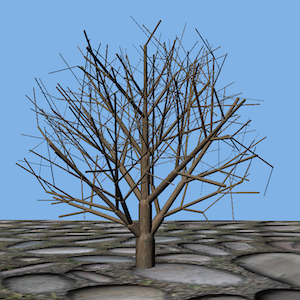
- Include randomization of branch length, branching angle, and selection among alternate substitution rules. Different generations of the L-system should look like refinements of each other, so you will need to be careful to ensure you do not change the random values from prior levels when you increase the L-system depth. For a traditional order-dependent random number generator, you will either need to remember the random values once generated, or re-seed the generator and ensure you always use your random numbers in the same order. As an alternative, you could use a hash-based random number generator (pcg3d is simple to implement and pretty good quality). Instead of getting different random numbers over sequential calls, this kind of generator returns a single random value or vector for a given key. The key can include an index if you really do want a sequence of values, but is more powerful when called with some set of invariants like level, string position, and seed value as the key. Each time you call the hash with that key, you'll get the same random value, but when called with a different key, you get a different random value.
Keep the same cross sectional area before and after each branch point. In other words, a trunk of radius $r$ has area proportional to $r^2$, so if it splits into two branches, their radii should be chosen to also give a total area proportional to $r^2$. So $r^2 = r_1^2 + r_2^2$. There are physical reasons that trees generally follow this ratio, as the tree's vascular pathways travel from the roots through the trunk into the branches, so the total cross section of the pathways remains constant. Using this ratio will make your trees look more realistic.
For this extra credit, you can start with a fixed-radius trunk, and shrink the radius as you branch. You can also introduce additional constraints on legal L-system strings, and/or add additional radius scaling symbol(s) to your grammar. In both cases, the idea would be to rely on the L-system rules to indicate where the branches are rather than try to infer that from the string.
Support pruning of your L-system with a pruning function that returns whether a point is inside or outside of the prune volume. If any vertex of a branch is outside the prune volume, do not include that branch or anything attached to it. You can require '[' and ']' symbols be correctly nested so a pruned branch can skip to the closing ']' of the current level.
The easiest way to define your pruning function is as an implicit function or combination of several implicit functions. Be sure your pruning function(s) include the entire trunk, or you may prune away your entire tree. For example. you could prune to a single sphere or ellipse as long as it touches the ground, or a combination of a sphere and cylinder to prune to a classic lollipop tree shape.
What to turn in
Do your development in the GLapp directory so we can find it. Also include an assn3.txt file at the top level of your repository telling us about your assignment. Tell us what works, and what does not. Also tell us what (if any) help you received from books, web sites, or people other than the instructor and TA.
Turn in this assignment electronically by pushing your source code to your class git repository by 11:59 PM on the day of the deadline and tagging the commit assn3. See the assn0 project description if you accidentally tag the wrong commit and need to retag.
You must make multiple commits along the way with useful checkin messages. We will be looking at your development process, so a complete and perfectly working assignment submitted in a single checkin one minute before the deadline will NOT get full credit. Individual checkins of complete files one at a time will not count as incremental commits. Do be sure to check in all of your source code, but no build files, log files, generated images, zip files, libraries, or other non-code content.
In addition to the assn3.txt, you should also commit one or more L-system rule files demonstrating your features and best tree(s).
If you attempt any extra credit, you must describe it in your assn3.txt. Do not expect the TA to scour your commit messages or code to figure out you did an extra credit and grade it for you.