by Dr. Kostas Kalpakis
Summer 2020
(last update Fall 2025)
© Copyright 2020
1. Introduction#
The SQL programming language has rich syntax with many variants and options. Moreover, database system S/W vendors often provide their own SQL dialects/extensions.
This review provides just a glimse of the many SQL statements.
We examine sample SQL statements that are useful and sufficient for satisfying most data management requirements frequently encountered in practice.
For a comprehensive review of SQL (including deviations from the SQL standard), the interested reader is referred to the SQL manuals of the chosen database server.
For concreteness, we use the university database in the book Database Systems Concepts (6th ed) by Silberschatz et al.
The SQL standard has gone through many revisions (from its 1987 version to the latest in 2019).
This review focuses on core language features of the SQL:1999 ANSI standard
Hereafter, following standard conventions, the terms relation, tuple, and attribute are interchangeable with the terms table, row, and column.
SQL (keywords and names) is case insensitive.
2. Initialization & Setup#
This notebook uses the sql line and cell magics. Refer to SQL_magic_demo.ipynb for a quick tutorial on using the %sql and %%sql magics.
In addition, it contains SQL statements for the MySQL and/or SQLite database systems.
2.1. Setup prerequisite S/W packages#
# install/upgrade python packages

#!pip install --upgrade pysqlite
#!pip install mysql-connector-python

# one of the following two
#!pip install ipython-sql
#!pip install jupysql duckdb-engine
# initialize notebook and load the sql magics
%matplotlib inline
# %load_ext sql
%load_ext isql
2.2. imports#
from IPython import get_ipython
# from IPython.display import display

import os
import sqlite3

import pandas as pd
import numpy as np

import re
import urllib.request
import getpass

import logging
# set pandas display options
pd.set_option('display.width', 120, 'display.max_columns', None,
              'display.expand_frame_repr', False, 'max_colwidth', 120)
# setup isql logger's logging level
# %isql --loglevel {logging.INFO}
2.3. Support functions#
We define python functions for easily managing SqlMagic options, and for getting metadata information about database objects such as tables and indexes, which are dependent on the database server used in a connection.
MySQL has special INFORMATION_SCHEMA tables that store metadata information. These tables can be accessed with SQL queries or special SQL commands which MySQL supports.
SHOW TABLES;
SHOW COLUMNS FROM <table_name>;
SHOW INDEX FROM <table_name>;
SQLite also has statements to retrieve metadata information about database objects
PRAGMA TABLE_INFO(<table_name>);
PRAGMA INDEX_LIST(<table_name>);
PRAGMA FOREIGN_KEY_LIST(<table_name>);
PRAGMA INDEX_INFO(<index_name>);
from utils import check_sqlite_version
from utils import sql_magic_toggle, current_dialect
from utils import metainfo_sqlite, metainfo_mysql, metainfo
from utils import metainfo2
from utils import cross_tab_emulation
from cross_tab_df import to_crosstab, build_example_xtab_query

from utils import find_extra_tables, cleanup_tables
3. Connect to a database#
3.1. establish connections#
# for SQLite databases

# Set the pathname for the local file that stores the SQLite database
db_filename = 'test.sqlite'

# download remote database from remote_db_url (if not None) to local db_filename
remote_db_url = "https://www.csee.umbc.edu/~kalpakis/courses/common/university-db.sqlite"
#remote_db_url = None
if remote_db_url is not None:
  urllib.request.urlretrieve(remote_db_url, filename=db_filename)
  print(f'downloaded {remote_db_url} \n\tto local file {db_filename}')

# set the database connection URL string
sqlite_url = f'sqlite:///{db_filename}'
downloaded https://www.csee.umbc.edu/~kalpakis/courses/common/university-db.sqlite
	to local file test.sqlite
# for MySQL databases
#
# Assumes that we have installed the mysql-connector-python package
#!pip install --upgrade mysql-connector-python
#
# for user 'scott' with password 'tiger' connecting to database 'foo'
# running on database server at IP address 'localhost',
# the connection URL string will look like

# connection_url = 'mysql+pymysql://scott:tiger@localhost/foo'
# connection_url = 'mysql+mysqlconnector://scott:tiger@localhost/foo'

# get DB username and password from the standard input
mysql_url = None

#set the default database tableschema
db_name = db_schema = 'university'

if True:
    db_user = getpass.getpass('Enter username') if db_user is None else db_user
    db_password = getpass.getpass('Enter password') if db_password is None else db_password
    mysql_url = f'mysql+mysqlconnector://{db_user}:{db_password}@localhost/{db_name}'
else:
    mysql_url = sqlite_url
# Open a connection to the database
%isql --alias C1 {sqlite_url}
%isql --alias C2 {mysql_url}
%isql C1
# set certain SqlMagic config params to control verbosity of sql magics
sql_magic_toggle(False, feedback=True)
pass
3.2. set current connection#
# available connections
%isql --connections
# %isql -l
| current | url | alias | |
|---|---|---|---|
| 0 | * | sqlite:///test.sqlite | C1 |
| 1 | mysql+mysqlconnector://root:***@localhost/university | C2 | |
| 2 | sqlite:/// | mem |
# C1: sqlite C2:mysql
%isql C2
4. SQL in 1 minute#
Suppose we wish to use a relational database system to
setup a table to store the name, email, zoom personal roomid, and birth-date of our friends
store information for some specific friends
review the stored records sorted by name
discard the table (since we changed our mind)
A simple SQL program performing these four tasks consists of the SQL statements given in the following four code cells.
%%isql
CREATE TABLE friends (
    name VARCHAR(20) NOT NULL,
    email VARCHAR(64) PRIMARY KEY,
    dob DATE,
    zoom_id INT UNIQUE);
%%isql
INSERT INTO friends VALUES('Bob', 'bob@there.earth', NULL, 5678);
INSERT INTO friends VALUES('Eve', 'eve@here.there', date('2020-05-31'), 9999);
INSERT INTO friends VALUES('Alice', 'alice@here.there', '1990-12-31', 1234);
%%isql
SELECT * FROM friends ORDER by name;
| name | dob | zoom_id | ||
|---|---|---|---|---|
| 0 | Alice | alice@here.there | 1990-12-31 | 1234 |
| 1 | Bob | bob@there.earth | None | 5678 |
| 2 | Eve | eve@here.there | 2020-05-31 | 9999 |
%%isql
DROP TABLE friends;
5. Concepts and terms I#
5.1. Users, agents, clients and servers#
A processor refers to a computer program that is executable in a computer system.
A database server is a processor that executes SQL statements and manages SQL data. The execution of a single SQL statement by the server often leads to a sequence of multiple operations on the SQL data.
An agent is that which causes the execution of SQL statements by the database server. An agent acts on behalf of user and uses a client to interact with the server.
A client is a processor that can communicate with a database server to request the execution of and retrieve the response to SQL statements. A client establishes a connection to a server, maintains information to manage its interaction with the server, interacts with the server, and finally terminates its connection to the server.
A session spans the execution of SQL statements during a particular client-server connection.
5.2. Tables#
A table has an ordered collection of one or more columns and an unordered collection of zero or more rows. Each column has a name, a data type and domain, a default, and a nullability characteristic. Each row has, for each column, exactly one value in the domain of the data type of that column.
A domain is a set of persmissible values and is either finite or infinite. A domain is either explicitly defined or is a domain implied by a built-in data type of the database system.
A query is a table expression that references zero or more tables, uses table operators, and returns a table. Table expressions are evaluated by the server.
A table is either one of the following types
a base table is either a persistent base table or a temporary table
a persistent base table is a named table defined by a
CREATE TABLEstatement which is stored in the databasea temporary table is a named table with limited scope and which is defined by a
CREATE TEMPORARY TABLEstatementtemporary tables are effectively materialized only when referenced in a session
a derived table is a table derived directly or indirectly from one or more other tables by evaluating a table expression
a named derived table is called a viewed table or simply view
a transient table is a named derived table that may come into existence implicitly during the evaluation of a statement
a transition table is a collection of rows being inserted, updated, or deleted when executing a SQL statement
A column of a base table is either a base column or a generated column. A base column is one for which each tuple of the table has a stored value. A generated column is one whose values are determined by evaluating an expression which may refer to other columns of the table to which it belongs but no other data.
5.3. Integrity constraints#
Integrity constraints define the valid states of the database data by constraining the values in the base tables.
An integrity constraint is either one of the following
a domain constraint which is associated with a domain and defines the valid values for all columns based on that domain or values casted to that domain
an assertion is a named constraint that may apply to the content of individual rows of a table, to the entire contents of a table, or to a state required to exist among several base tables.
a table constraint
A table constraint is associated with a single base table and is either one of the following
a unique constraint specifies one or more columns of the table as unique columns, and it is is satisfied if and only if no two of its rows have the same non-NULL values in the unique columns.
a primary key constraint specifies one or more columns as
PRIMARY KEYcolumns, and is a unique constraint with the additional requirement that every row has non-NULL values on the PRIMARY KEY columnsa referential constraint, also called foreign-key (reference) constraint, specifies the requirement of the existence of a row in another table (called parent table) for each row of the current table (called child table) that agree on certain child and parent table columns
a check constraint is a boolean predicate that each row of a table is required to satisfy
5.3.1. Checking of constraints#
Every constraint has a mode
immediate: the constraint is checked at the end of each SQL statement
deferred: the constraint is checked when its mode changes to immediate.
When a constraint is checked, if it is not satisfied the server raises an exception to the client and the effects of a client’s current statement or transaction on the database are discarded by the server.
Every constraint is either deferrable or non-deferrable (and its mode is immediate). A client may toggle the mode of a deferrable constraint with a SQL statement. A SQL transaction may change the mode of deferrable constraints
to deferred upon the start of the transaction
to immediate at any time prior to the end of the transaction (explicitly or implicitly due to a
COMMITstatement); if an exception is raised, the transaction is terminated by an implicitROLLBACKstatement.
SQL transactions are discussed further below.
6. Creating, altering, and dropping tables#
6.1. Dropping a table#
To discard an existing table, its associated data, and any dependent database objects (eg integrity constraints, indexes, triggers, etc), we use the statement
DROP TABLE [IF EXISTS] <table-name>;
6.2. Domain types#
Built-in domain and data types that can be used to specify attributes of tables are
CHAR(n)
VARCHAR(n)
INT
SMALLINT
NUMERIC(p,d)
REAL
DOUBLE
FLOAT(n)
DATE
TIME
TIMESTAMP
BLOB
TEXT
ENUM
Database systems often allow user-defined domain types.
6.3. Creating a table#
The basic syntax of the SQL statement for creating a table is
CREATE TABLE [IF NOT EXISTS] <table-name>(
   <attribute-specifications>
   [, <table-constraints>]);
where an attribute specification is
<attribute-name> <domain-type> [NOT NULL] [DEFAULT <value>]
<attribute-name> <domain-type> AS (<expr>)[VIRTUAL|STORED]
and a table constraint is one of
PRIMARY KEY(<attributes>)
UNIQUE(<attributes>)
CHECK(<boolean-predicate>)
FOREIGN KEY <attributes> REFERENCES <parent-table>[(<parent-primary-key-attributes>)]
The database server builds and maintains appropriate indexes to support each one of the primary key and unique constraints.
a database index is a special data structure for efficiently finding tuples in a table based on some search condition
6.4. Foreign key reference constraints#
A foreign key reference constraint from one table into another table on some attributes (referred to as the child table, parent table, child key, and parent key attributes respectively) is specified in the child table using
<foreing_key_constraint> ::
    FOREIGN KEY <child_key> REFERENCES <parent_table>[(<parent_key>)] [ON DELETE <action>] [ON UPDATE <action>]
<action> :: RESTRICT|CASCADE|SET NULL|SET DEFAULT
expresses the requirement that
for each child tuple there exists a unique parent tuple whose primary key attributes agree in value with the child tuple on the child key attributes.
Effectively,
the child key value of a child tuple is a “pointer/reference/address” into a unique parent tuple with matching parent key value
a parent tuple may have multiple child tuples pointing to it; we say that a parent tuple owns its children tuples
Often times, a foreign key reference constraint also specifies what action the database server is to take on the children tuples owned by a parent tuple when the parent tuple is deleted or its parent key value changes
reject the change to the parent key value of the parent tuple (aka
RESTRICT), the default actioncascade the change to the child key attributes of its children tuples
set the child key attributes of its children tuples to NULL or their default value as specified in the child table
6.5. Example: creating a table with foreign key reference constraints#
%%isql --dialect sqlite
-- # Enable enforcement of foreign key constraints

PRAGMA foreign_keys = ON;
%%isql --dialect mysql
-- # Enable/Disable enforcement of foreign key constraints

SET foreign_key_checks = ON;
SHOW VARIABLES LIKE 'foreign_key_checks';
%%isql
-- # Creating a new instructor table

DROP TABLE IF EXISTS _instructor;

CREATE TABLE _instructor(
   id VARCHAR(5),
   name VARCHAR(20) NOT NULL,
   dept_name VARCHAR(20) NOT NULL DEFAULT 'College',
   salary NUMERIC(8,2) CHECK(salary > 0),
   PRIMARY KEY(id),
   UNIQUE(name, dept_name),
   FOREIGN KEY(dept_name) REFERENCES department(dept_name)
      ON DELETE SET DEFAULT
      ON UPDATE CASCADE
);

-- insert some tuples
insert into _instructor select * from instructor;
select * from _instructor limit 5;
| id | name | dept_name | salary | |
|---|---|---|---|---|
| 0 | 10101 | Srinivasan | Comp. Sci. | 65000.00 |
| 1 | 12121 | Wu | Finance | 90000.00 |
| 2 | 15151 | Mozart | Music | 40000.00 |
| 3 | 22222 | Einstein | Physics | 95000.00 |
| 4 | 32343 | El Said | History | 60000.00 |
# metainfo(tableschema=tableschema, tablename='_instructor', limit=None)
metainfo2('_instructor')
Metadata for table '_instructor':
Columns
| name | type | nullable | default | autoincrement | primary_key | unique | index | computed | comment | |
|---|---|---|---|---|---|---|---|---|---|---|
| 0 | id | VARCHAR(5) | False | None | auto | True | None | None | None | None |
| 1 | name | VARCHAR(20) | False | None | auto | False | None | None | None | None |
| 2 | dept_name | VARCHAR(20) | False | None | auto | False | None | None | None | None |
| 3 | salary | DECIMAL(8, 2) | True | None | auto | False | None | None | None | None |
Indexes
| name | column_names | unique | type | |
|---|---|---|---|---|
| 0 | dept_name | [dept_name] | False | NaN |
| 1 | name | [name, dept_name] | True | UNIQUE |
primary key constraints:
| constrained_columns | name | |
|---|---|---|
| 0 | [id] | None |
unique constraints:
| name | column_names | duplicates_index | |
|---|---|---|---|
| 0 | name | [name, dept_name] | name |
foreign key reference constraints:
| name | constrained_columns | referred_schema | referred_table | referred_columns | options | |
|---|---|---|---|---|---|---|
| 0 | _instructor_ibfk_1 | [dept_name] | university | department | [dept_name] | {'onupdate': 'CASCADE', 'ondelete': 'SET DEFAULT'} |
check constraints:
| name | sqltext | |
|---|---|---|
| 0 | _instructor_chk_1 | (`salary` > 0) |
6.6. Modifying the structure of an existing table#
Database systems offer many variants of SQL statements for modifying the structure of an existing table, e.g. for adding/dropping attributes and constraints.
ALTER TABLE <table-name> ADD <attribute-specification>;
ALTER TABLE <table-name> DROP <attribute-name>;
%%isql
-- # Extend the instructor tuples with a zipcode attribute with default value 21250.

ALTER TABLE _instructor ADD zipcode CHAR(5) DEFAULT '21250';
SELECT * FROM _instructor;
| id | name | dept_name | salary | zipcode | |
|---|---|---|---|---|---|
| 0 | 10101 | Srinivasan | Comp. Sci. | 65000.00 | 21250 |
| 1 | 12121 | Wu | Finance | 90000.00 | 21250 |
| 2 | 15151 | Mozart | Music | 40000.00 | 21250 |
| 3 | 22222 | Einstein | Physics | 95000.00 | 21250 |
| 4 | 32343 | El Said | History | 60000.00 | 21250 |
| 5 | 33456 | Gold | Physics | 87000.00 | 21250 |
| 6 | 45565 | Katz | Comp. Sci. | 75000.00 | 21250 |
| 7 | 58583 | Califieri | History | 62000.00 | 21250 |
| 8 | 76543 | Singh | Finance | 80000.00 | 21250 |
| 9 | 76766 | Crick | Biology | 72000.00 | 21250 |
| 10 | 83821 | Brandt | Comp. Sci. | 92000.00 | 21250 |
| 11 | 98345 | Kim | Elec. Eng. | 80000.00 | 21250 |
# metainfo(tableschema=tableschema, tablename='_instructor', limit=1)
metainfo2('_instructor')
Metadata for table '_instructor':
Columns
| name | type | nullable | default | autoincrement | primary_key | unique | index | computed | comment | |
|---|---|---|---|---|---|---|---|---|---|---|
| 0 | id | VARCHAR(5) | False | None | auto | True | None | None | None | None |
| 1 | name | VARCHAR(20) | False | None | auto | False | None | None | None | None |
| 2 | dept_name | VARCHAR(20) | False | None | auto | False | None | None | None | None |
| 3 | salary | DECIMAL(8, 2) | True | None | auto | False | None | None | None | None |
| 4 | zipcode | CHAR(5) | True | None | auto | False | None | None | None | None |
Indexes
| name | column_names | unique | type | |
|---|---|---|---|---|
| 0 | dept_name | [dept_name] | False | NaN |
| 1 | name | [name, dept_name] | True | UNIQUE |
primary key constraints:
| constrained_columns | name | |
|---|---|---|
| 0 | [id] | None |
unique constraints:
| name | column_names | duplicates_index | |
|---|---|---|---|
| 0 | name | [name, dept_name] | name |
foreign key reference constraints:
| name | constrained_columns | referred_schema | referred_table | referred_columns | options | |
|---|---|---|---|---|---|---|
| 0 | _instructor_ibfk_1 | [dept_name] | university | department | [dept_name] | {'onupdate': 'CASCADE', 'ondelete': 'SET DEFAULT'} |
check constraints:
| name | sqltext | |
|---|---|---|
| 0 | _instructor_chk_1 | (`salary` > 0) |
%%isql --dialect mysql
-- # Discard a column from a table

ALTER TABLE _instructor DROP zipcode;
SELECT * FROM _instructor LIMIT 3;
| id | name | dept_name | salary | |
|---|---|---|---|---|
| 0 | 10101 | Srinivasan | Comp. Sci. | 65000.00 |
| 1 | 12121 | Wu | Finance | 90000.00 |
| 2 | 15151 | Mozart | Music | 40000.00 |
7. Concepts and terms II#
7.1. Cursor#
A cursor is an iterator mechanism by which a client may act on the rows of a (result) table, one row at a time. A cursor can be in an open or close state. An open cursor specifies an associated table, an ordering of the rows for that table, and a row position relative to that ordering
the position of an open cursor is either before a certain row, on a certain row, or after the last row
if a cursor is on a row, then that row is the current row of the cursor
an open cursor is initially before the first row of the table
a cursor may be before the first row or after the last row even if the table is empty
A cursor is either
updatable (if
FOR UPDATE OFis specified when the cursor defined), which allows the client to update the current row of the cursoror not updatable
7.2. Query evaluation#
To evaluate a query (table expression), the database server carries a number of steps for each query:
checks that the query is syntactically valid SQL
checks that the client’s agent has sufficient privileges to access the referenced database data or metadata
checks that all referenced database objects exist and builds a parse tree using a SQL parser
transforms the parse tree into an expression tree, which is a rooted tree that has table variables as leaf nodes and various simple table (relational algebra) operators as internal nodes, with the root node representing the result of the query
transforms the expression tree into an optimized query evaluation plan, which is a logically-equivalent rooted tree whose nodes are calls to concrete executable functions with specific parameter values
the query plan is then evaluated by the query evaluation module of the server and the result table is made available to the client
The database server takes similar steps for executing all SQL statements.
There is an enormous number of ways to construct evaluation plans.
Since clients often use (implicit or explicit) cursors to access the result table of a query
modern servers build evaluation plans whose methods are iterator data structures, i.e. have open(), next(), has_more(), close() calls
the client’s cursor is identified with the root iterator of the evaluation plan
the query evaluation module is then evaluated in a pull-mode (where a open/next/close call at the root causes a cascade of such calls in the children) or in a push-mode (where a newly available row at a leaf operand table causes a a cascade of next calls at its parent node).
We will often make use of simplistic query evaluation plans (i.e. tree of iterators) to analyze the operational semantics of SQL statements.
8. Structure of common SQL query statements#
SQL is a declarative programming language for database processors.
A SQL statement specifies a desired outcome (output) that is to be derived from the database.
When developing a SQL query, we sometimes express the desired outcome (result table) as a sequence of simple transformations of some input tables.
The database server is expected to achieve the desired outcome in an efficient manner, and hence it is free to perform whatever operations needed that lead to the same desired outcome.
The structure of a common SQL query statement is
SELECT <attribute_references>
[FROM <table_references>]
[WHERE <tuple_selection_predicate> ]
[GROUP BY <group_partition_attributes>
  [HAVING <group_selection_predicate>] ]
[ORDER BY <attributes> [ASC|DESC] ]
[LIMIT <num> [OFFSET <num>]] ;
where the SELECT clause is required, while all the other clauses are optional.
We will see details of the syntax and semantics for these clauses below.
The FROM, WHERE, GROUP BY, and HAVING clauses constitute the core table expression segment of
a SQL query statement,
while the SELECT, ORDER BY, and LIMIT clauses often constitute the cursor segment
of a SQL query statement.
The FROM clause contains references (names) to the query’s input tables.
Each table reference provides an (implicit) iterator variable that ranges over the table’s rows.
The SELECT clause contains references to columns of the result table.
For each SQL query statement submitted to the server by a client, the server evaluates the query and makes its result table available to the client. By default, the server provides no guaranteed order for the tuples in the result table.
Clients usually act on the result tuples one at a time by (implicitly or explicitly) opening a cursor. Consequently, for performance reasons, database servers may partially materialize the result table (e.g. produce the rows of a result table one at a time, and store only the current row of the client’s open cursor).
9. Querying a single table#
We begin by considering queries on a single input table.
These queries will have a FROM clause with a single reference to an input table.
Each tuple from the input table will be contributing at most one tuple towards the result table.
9.1. Projecting attributes to the result table#
To express a desire for a result table that has only some of the columns of the input table, we include in the SELECT clause references to all those columns that are to be retained
[<table_reference>.]<attribute_name>
The table reference is required in an attribute reference when there are homonymous input attributes (different attributes with the same name).
%%isql
-- # Find the names and department names of the instructors

SELECT name, dept_name
FROM instructor;
| name | dept_name | |
|---|---|---|
| 0 | Srinivasan | Comp. Sci. |
| 1 | Wu | Finance |
| 2 | Mozart | Music |
| 3 | Einstein | Physics |
| 4 | El Said | History |
| 5 | Gold | Physics |
| 6 | Katz | Comp. Sci. |
| 7 | Califieri | History |
| 8 | Singh | Finance |
| 9 | Crick | Biology |
| 10 | Brandt | Comp. Sci. |
| 11 | Kim | Elec. Eng. |
%%isql
-- # Find the department names of the instructors

SELECT dept_name FROM instructor;
| dept_name | |
|---|---|
| 0 | Biology |
| 1 | Comp. Sci. |
| 2 | Comp. Sci. |
| 3 | Comp. Sci. |
| 4 | Elec. Eng. |
| 5 | Finance |
| 6 | Finance |
| 7 | History |
| 8 | History |
| 9 | Music |
| 10 | Physics |
| 11 | Physics |
9.2. Supressing duplicate tuples from the result table#
By default, duplicate tuples are not discarded from the result of a query (since doing so often entails a performance loss in processing the query).
Use the DISTINCT operator to supress duplicate tuples from the result table of a query.
%%isql
-- # Find the unique departments of the instructors

SELECT DISTINCT dept_name
FROM instructor;
| dept_name | |
|---|---|
| 0 | Biology |
| 1 | Comp. Sci. |
| 2 | Elec. Eng. |
| 3 | Finance |
| 4 | History |
| 5 | Music |
| 6 | Physics |
%%isql
-- # Retrieve unique dept_name, salary tuples of the instructors

SELECT DISTINCT dept_name, salary
FROM instructor;
| dept_name | salary | |
|---|---|---|
| 0 | Comp. Sci. | 65000.00 |
| 1 | Finance | 90000.00 |
| 2 | Music | 40000.00 |
| 3 | Physics | 95000.00 |
| 4 | History | 60000.00 |
| 5 | Physics | 87000.00 |
| 6 | Comp. Sci. | 75000.00 |
| 7 | History | 62000.00 |
| 8 | Finance | 80000.00 |
| 9 | Biology | 72000.00 |
| 10 | Comp. Sci. | 92000.00 |
| 11 | Elec. Eng. | 80000.00 |
9.3. The * operator#
The * operator expands to the list of references to all the attributes of a referenced table
(in the order those attributes were defined in the table)
[<table_reference>.]*
where the optional table reference defaults to the query’s core table.
%%isql
-- # Retrieve all attributes of instructors

SELECT *
FROM instructor;
| ID | name | dept_name | salary | |
|---|---|---|---|---|
| 0 | 10101 | Srinivasan | Comp. Sci. | 65000.00 |
| 1 | 12121 | Wu | Finance | 90000.00 |
| 2 | 15151 | Mozart | Music | 40000.00 |
| 3 | 22222 | Einstein | Physics | 95000.00 |
| 4 | 32343 | El Said | History | 60000.00 |
| 5 | 33456 | Gold | Physics | 87000.00 |
| 6 | 45565 | Katz | Comp. Sci. | 75000.00 |
| 7 | 58583 | Califieri | History | 62000.00 |
| 8 | 76543 | Singh | Finance | 80000.00 |
| 9 | 76766 | Crick | Biology | 72000.00 |
| 10 | 83821 | Brandt | Comp. Sci. | 92000.00 |
| 11 | 98345 | Kim | Elec. Eng. | 80000.00 |
9.4. Sorting the result table#
By default, the database server does not guarantee a particular order for the tuples in the result table.
When, we desire to sorted access the rows of the result table,
we use the ORDER BY clause to explicitly sort the rows of the result table.
Caution: sorting is a blocking operation, i.e. the 1st output tuple may not be accessible by the client until all the result tuples are found and sorted. Hence, the client often experiences a longer response time than if the result table was left unsorted.
%%isql
-- # Find the instructor's department names in ascending order
-- # and name in descending order

SELECT dept_name, name
FROM instructor
ORDER BY dept_name ASC, name DESC;
| dept_name | name | |
|---|---|---|
| 0 | Biology | Crick |
| 1 | Comp. Sci. | Srinivasan |
| 2 | Comp. Sci. | Katz |
| 3 | Comp. Sci. | Brandt |
| 4 | Elec. Eng. | Kim |
| 5 | Finance | Wu |
| 6 | Finance | Singh |
| 7 | History | El Said |
| 8 | History | Califieri |
| 9 | Music | Mozart |
| 10 | Physics | Gold |
| 11 | Physics | Einstein |
%%isql
-- # Find the instructor's department names in ascending order
-- # and name in descending order

SELECT name, dept_name
FROM instructor
ORDER BY name ASC, salary ASC;
| name | dept_name | |
|---|---|---|
| 0 | Brandt | Comp. Sci. |
| 1 | Califieri | History |
| 2 | Crick | Biology |
| 3 | Einstein | Physics |
| 4 | El Said | History |
| 5 | Gold | Physics |
| 6 | Katz | Comp. Sci. |
| 7 | Kim | Elec. Eng. |
| 8 | Mozart | Music |
| 9 | Singh | Finance |
| 10 | Srinivasan | Comp. Sci. |
| 11 | Wu | Finance |
9.5. Deriving additional attributes for the result table#
Use expressions in the SELECT clause to create new generated attributes for the result table
based on its existing attributes.
These expressions
evaluate to a scalar value for each one tuple in the result table
involve attribute references to (existing) attributes of result table
may use build-in or stored/user-defined functions
numeric operators and functions, eg +, -,
log(),sqrt()string manipulation operators and functions, eg
regexp(),strlen(),upcase()date and time functions, eg
month(),day()
The database server gives default names to such derived attributes.
%%isql
-- # Find the names and monthly salary of the instructors

SELECT name, salary/12
FROM instructor;
| name | salary/12 | |
|---|---|---|
| 0 | Srinivasan | 5416.666667 |
| 1 | Wu | 7500.000000 |
| 2 | Mozart | 3333.333333 |
| 3 | Einstein | 7916.666667 |
| 4 | El Said | 5000.000000 |
| 5 | Gold | 7250.000000 |
| 6 | Katz | 6250.000000 |
| 7 | Califieri | 5166.666667 |
| 8 | Singh | 6666.666667 |
| 9 | Crick | 6000.000000 |
| 10 | Brandt | 7666.666667 |
| 11 | Kim | 6666.666667 |
9.6. Renaming attributes of the result table#
Use the AS alias operator for renaming attributes of the result table.
The names associated with the attribute references in the SELECT clause are visible
to, and (often) convenient for, the client.
%%isql
-- # renaming existing attributes

SELECT name, dept_name AS Dept
FROM instructor;
| name | Dept | |
|---|---|---|
| 0 | Srinivasan | Comp. Sci. |
| 1 | Wu | Finance |
| 2 | Mozart | Music |
| 3 | Einstein | Physics |
| 4 | El Said | History |
| 5 | Gold | Physics |
| 6 | Katz | Comp. Sci. |
| 7 | Califieri | History |
| 8 | Singh | Finance |
| 9 | Crick | Biology |
| 10 | Brandt | Comp. Sci. |
| 11 | Kim | Elec. Eng. |
%%isql
-- # renaming generated attributes

SELECT name, salary/12 AS montlhy_salary
FROM instructor;
| name | montlhy_salary | |
|---|---|---|
| 0 | Srinivasan | 5416.666667 |
| 1 | Wu | 7500.000000 |
| 2 | Mozart | 3333.333333 |
| 3 | Einstein | 7916.666667 |
| 4 | El Said | 5000.000000 |
| 5 | Gold | 7250.000000 |
| 6 | Katz | 6250.000000 |
| 7 | Califieri | 5166.666667 |
| 8 | Singh | 6666.666667 |
| 9 | Crick | 6000.000000 |
| 10 | Brandt | 7666.666667 |
| 11 | Kim | 6666.666667 |
9.7. Filtering input tuples I#
So far, each tuple of the input table contributes one tuple to the result table.
We often desire to filter tuples from the input table in order to control which tuples are contributing towards the result table.
To specify such filtering, we use logical (boolean) predicates in the WHERE clause.
These predicates often involve logical connectors, relative comparison operators, scalars,
calls to SQL functions, and attribute references to attributes of the input tables.
Each tuple of the input table contributes a tuple to the result table only if the predicate
in the WHERE clause evaluates to TRUE.
%%isql
-- # Find the names of Physics instructors

SELECT name
FROM instructor
WHERE dept_name = 'Physics';
| name | |
|---|---|
| 0 | Einstein |
| 1 | Gold |
%%isql
-- # Find the names of instructors with salary in the range 50K-70K

SELECT name
FROM instructor
WHERE salary BETWEEN 50000 and 70000;
| name | |
|---|---|
| 0 | Srinivasan |
| 1 | El Said |
| 2 | Califieri |
%%isql
-- # Find the names of Music instructors whose name ends in 't'

SELECT name
FROM instructor
WHERE dept_name = 'Music' AND name LIKE 'M__%t';
| name | |
|---|---|
| 0 | Mozart |
9.8. Limiting the range of the result table at the client#
By default, all the tuples in the result table are made available to the client by the database server. A client typically requests result tuples one-at-time using the cursor iterator mechanism.
The LIMIT clause allows us to further restrict the range of tuples that
are made available to the client, by skiping the first \(M\)
and returning the next (up to) \(N\) tuples in the result table
LIMIT <N> [OFFSET <M>]
%%isql
-- # Find the id and name of instructors;
-- # return up to 5 records after the first 2 found.

SELECT id, name
FROM instructor
-- ORDER BY salary
LIMIT 5 OFFSET 2;
| id | name | |
|---|---|---|
| 0 | 15151 | Mozart |
| 1 | 22222 | Einstein |
| 2 | 32343 | El Said |
| 3 | 33456 | Gold |
| 4 | 45565 | Katz |
9.9. Aggregating the result table#
Another way to reduce the length of the result table that is made available to the client is to aggregate (summarize) the tuples in the result table, and then make the aggregated result table (i.e. the collection of those summarized tuples) available to the client instead.
For brevity and convenience, we refer to the result of the table expression that corresponds to the FROM and WHERE clause
of a SQL query statement as the pre-aggregation result table.
We compute table-wise aggregates (often, statistical summaries such as sum, count, average, min, max etc) of the attribute values of the tuples in the pre–aggregation result table by calling server-supported aggregate functions on attributes of the pre-aggregation result table.
The (aggregated) result table has the aggregates as columns and has at most one tuple.
%%isql
-- # Find the number, average salary, and number of unique departments and of all insructors

SELECT COUNT(*), AVG(salary), COUNT(DISTINCT dept_name)
FROM instructor;
| COUNT(*) | AVG(salary) | COUNT(DISTINCT dept_name) | |
|---|---|---|---|
| 0 | 12 | 74833.333333 | 7 |
Use the GROUP BY clause to partition the tuples of the pre-aggregation result table into
disjoint groups based on their value on certain grouping attributes, and then aggregate the tuples in each group.
Group-wise aggregation creates a table with one tuple for each distinct group found. These tuples have as attributes the grouping attributes together with the aggregates computed for each group.
Attribute references, besides references to the aggregates,
that appear in the SELECT and ORDER BY clauses of aggregate SQL queries
must be functionally dependent on the aggregates or attribute references that appear in its GROUP BY clause.
%%isql
-- # Find the departments, the average-by-department salary,
-- # count-by-department instructors;
-- # order the result in decsending order of the instructors count

SELECT dept_name, AVG(salary), COUNT(*)
FROM instructor
GROUP BY dept_name
ORDER BY COUNT(*) DESC;
| dept_name | AVG(salary) | COUNT(*) | |
|---|---|---|---|
| 0 | Comp. Sci. | 77333.333333 | 3 |
| 1 | Finance | 85000.000000 | 2 |
| 2 | History | 61000.000000 | 2 |
| 3 | Physics | 91000.000000 | 2 |
| 4 | Biology | 72000.000000 | 1 |
| 5 | Elec. Eng. | 80000.000000 | 1 |
| 6 | Music | 40000.000000 | 1 |
To filter group-wise aggregation tuples, we use a boolean predicate in the HAVING clause.
This HAVING clause predicate may have references to the aggregates or attributes that are functionally
dependent on the GROUP BY attributes.
%%isql
-- # Find the departments and average-by-department salary of instructors,
-- # restricted to those departments with average salary above 70K

SELECT dept_name, AVG(salary)
FROM instructor
GROUP BY dept_name
HAVING AVG(salary) >= 70000;
| dept_name | AVG(salary) | |
|---|---|---|
| 0 | Biology | 72000.000000 |
| 1 | Comp. Sci. | 77333.333333 |
| 2 | Elec. Eng. | 80000.000000 |
| 3 | Finance | 85000.000000 |
| 4 | Physics | 91000.000000 |
%%isql
-- # Find the departments and average-by-department salary of instructors with salary less than 80K,
-- # restricted to those departments with average salary above 70K

SELECT dept_name, AVG(salary)
FROM instructor
-- WHERE dept_name LIKE '%y'
WHERE salary < 80000
GROUP BY dept_name
HAVING AVG(salary) >= 70000;
| dept_name | AVG(salary) | |
|---|---|---|
| 0 | Biology | 72000.000000 |
| 1 | Comp. Sci. | 70000.000000 |
10. Working with NULL in SQL queries#
To indicate that the value of a tuple’s attribute is unknown or does not exist, we set its value to the special value NULL.
The presence of NULL values complicates logical and comparison predicates by introducing a 3-valued logic: true, false, and unknown.
| x | y | x AND y | x OR y | NOT x |
| True | True | True | True | False |
| True | False | False | True | False |
| False | False | False | False | True |
| unknown | True | unknown | True | unknown |
| unknown | False | False | unknown | unknown |
Further,
a relative comparison with a
NULLvalued operand always evaluates to unknownwe need compare an operand’s value to
NULLusing
<operand> IS [NOT] NULL
%%isql
-- # Find takes records without a grade

SELECT *
FROM takes
WHERE grade IS NULL;
| ID | course_id | sec_id | semester | year | grade | |
|---|---|---|---|---|---|---|
| 0 | 98988 | BIO-301 | 1 | Summer | 2010 | None |
A useful function when working with NULLs is the COALESCE SQL function which returns the 1st non-NULL value in its arguments (in the left-to-right order):
%%isql
SELECT COALESCE(NULL, NULL, NULL, 4), COALESCE(NULL, 1, NULL, 4);
| COALESCE(NULL, NULL, NULL, 4) | COALESCE(NULL, 1, NULL, 4) | |
|---|---|---|
| 0 | 4 | 1 |
%%isql
-- # Find takes records without a grade

SELECT *, COALESCE(grade, 'oops')
FROM takes
where grade is Null or grade = 'A';
| ID | course_id | sec_id | semester | year | grade | COALESCE(grade, 'oops') | |
|---|---|---|---|---|---|---|---|
| 0 | 00128 | CS-101 | 1 | Fall | 2009 | A | A |
| 1 | 12345 | CS-190 | 2 | Spring | 2009 | A | A |
| 2 | 12345 | CS-315 | 1 | Spring | 2010 | A | A |
| 3 | 12345 | CS-347 | 1 | Fall | 2009 | A | A |
| 4 | 76543 | CS-101 | 1 | Fall | 2009 | A | A |
| 5 | 76543 | CS-319 | 2 | Spring | 2010 | A | A |
| 6 | 98988 | BIO-101 | 1 | Summer | 2009 | A | A |
| 7 | 98988 | BIO-301 | 1 | Summer | 2010 | None | oops |
11. Querying multiple input tables I: Cartesian Product#
When we desire to query data from multiple input tables,
we include references to those input tables in the FROM clause.
Given a comma list of table references in the FROM clause,
for each possible way to choose a tuple from each referenced table,
construct a new tuple by juxtaposing (concatenating) the chosen tuples
(in the same order the tables appear in the list).
This is essentially the Cartesian product of the referenced tables.
We often refer to this new tuple as a joined input tuple.
It is useful to view the Cartesian product of two tables as an (nested–loop) iterator
Cartesian product R x S is logically given by
    foreach pair of tuples (r, s) such that r is in R and s is in S
        yield juxtapose(r, s)
%%isql
-- # Find the (Cartesian) product of the instructor and teaches tables

SELECT *
FROM instructor, teaches
LIMIT 30;
| ID | name | dept_name | salary | ID | course_id | sec_id | semester | year | |
|---|---|---|---|---|---|---|---|---|---|
| 0 | 98345 | Kim | Elec. Eng. | 80000.00 | 76766 | BIO-101 | 1 | Summer | 2009 |
| 1 | 83821 | Brandt | Comp. Sci. | 92000.00 | 76766 | BIO-101 | 1 | Summer | 2009 |
| 2 | 76766 | Crick | Biology | 72000.00 | 76766 | BIO-101 | 1 | Summer | 2009 |
| 3 | 76543 | Singh | Finance | 80000.00 | 76766 | BIO-101 | 1 | Summer | 2009 |
| 4 | 58583 | Califieri | History | 62000.00 | 76766 | BIO-101 | 1 | Summer | 2009 |
| 5 | 45565 | Katz | Comp. Sci. | 75000.00 | 76766 | BIO-101 | 1 | Summer | 2009 |
| 6 | 33456 | Gold | Physics | 87000.00 | 76766 | BIO-101 | 1 | Summer | 2009 |
| 7 | 32343 | El Said | History | 60000.00 | 76766 | BIO-101 | 1 | Summer | 2009 |
| 8 | 22222 | Einstein | Physics | 95000.00 | 76766 | BIO-101 | 1 | Summer | 2009 |
| 9 | 15151 | Mozart | Music | 40000.00 | 76766 | BIO-101 | 1 | Summer | 2009 |
| 10 | 12121 | Wu | Finance | 90000.00 | 76766 | BIO-101 | 1 | Summer | 2009 |
| 11 | 10101 | Srinivasan | Comp. Sci. | 65000.00 | 76766 | BIO-101 | 1 | Summer | 2009 |
| 12 | 98345 | Kim | Elec. Eng. | 80000.00 | 76766 | BIO-301 | 1 | Summer | 2010 |
| 13 | 83821 | Brandt | Comp. Sci. | 92000.00 | 76766 | BIO-301 | 1 | Summer | 2010 |
| 14 | 76766 | Crick | Biology | 72000.00 | 76766 | BIO-301 | 1 | Summer | 2010 |
| 15 | 76543 | Singh | Finance | 80000.00 | 76766 | BIO-301 | 1 | Summer | 2010 |
| 16 | 58583 | Califieri | History | 62000.00 | 76766 | BIO-301 | 1 | Summer | 2010 |
| 17 | 45565 | Katz | Comp. Sci. | 75000.00 | 76766 | BIO-301 | 1 | Summer | 2010 |
| 18 | 33456 | Gold | Physics | 87000.00 | 76766 | BIO-301 | 1 | Summer | 2010 |
| 19 | 32343 | El Said | History | 60000.00 | 76766 | BIO-301 | 1 | Summer | 2010 |
| 20 | 22222 | Einstein | Physics | 95000.00 | 76766 | BIO-301 | 1 | Summer | 2010 |
| 21 | 15151 | Mozart | Music | 40000.00 | 76766 | BIO-301 | 1 | Summer | 2010 |
| 22 | 12121 | Wu | Finance | 90000.00 | 76766 | BIO-301 | 1 | Summer | 2010 |
| 23 | 10101 | Srinivasan | Comp. Sci. | 65000.00 | 76766 | BIO-301 | 1 | Summer | 2010 |
| 24 | 98345 | Kim | Elec. Eng. | 80000.00 | 10101 | CS-101 | 1 | Fall | 2009 |
| 25 | 83821 | Brandt | Comp. Sci. | 92000.00 | 10101 | CS-101 | 1 | Fall | 2009 |
| 26 | 76766 | Crick | Biology | 72000.00 | 10101 | CS-101 | 1 | Fall | 2009 |
| 27 | 76543 | Singh | Finance | 80000.00 | 10101 | CS-101 | 1 | Fall | 2009 |
| 28 | 58583 | Califieri | History | 62000.00 | 10101 | CS-101 | 1 | Fall | 2009 |
| 29 | 45565 | Katz | Comp. Sci. | 75000.00 | 10101 | CS-101 | 1 | Fall | 2009 |
The Cartesian product sometimes is called the CROSS JOIN operator, .e.g.
instructor CROSS JOIN teaches
A tuple variable for a table is an iterator variable that iterates (loops) over the tuples in that table. Tuple variables allow us to refer to tuple attributes from specific tables.
Each table reference that occurs in the FROM clause
provides us with a tuple variable that ranges over tuples of that table.
The implicit (default) name of that tuple variable is the table’s name.
The notion of tuple variables is handy for resolving ambiguities
among attribute references to homonymous attributes
of the referenced tables in the FROM clause.
%%isql
-- # Find id, name, course ID, semester, and year of courses taught by Biology instructors

SELECT instructor.id, name, course_id, semester, year
FROM instructor, teaches
WHERE instructor.id = teaches.id ;
| id | name | course_id | semester | year | |
|---|---|---|---|---|---|
| 0 | 10101 | Srinivasan | CS-101 | Fall | 2009 |
| 1 | 10101 | Srinivasan | CS-315 | Spring | 2010 |
| 2 | 10101 | Srinivasan | CS-347 | Fall | 2009 |
| 3 | 12121 | Wu | FIN-201 | Spring | 2010 |
| 4 | 15151 | Mozart | MU-199 | Spring | 2010 |
| 5 | 22222 | Einstein | PHY-101 | Fall | 2009 |
| 6 | 32343 | El Said | HIS-351 | Spring | 2010 |
| 7 | 45565 | Katz | CS-101 | Spring | 2010 |
| 8 | 45565 | Katz | CS-319 | Spring | 2010 |
| 9 | 76766 | Crick | BIO-101 | Summer | 2009 |
| 10 | 76766 | Crick | BIO-301 | Summer | 2010 |
| 11 | 83821 | Brandt | CS-190 | Spring | 2009 |
| 12 | 83821 | Brandt | CS-190 | Spring | 2009 |
| 13 | 83821 | Brandt | CS-319 | Spring | 2010 |
| 14 | 98345 | Kim | EE-181 | Spring | 2009 |
Use the AS alias operator to rename a table reference and its implicit tuple variable in the FROM clause
<table_reference> [AS] <table_alias>
Renaming table references is handy when multiple references to the same table are desired in the FROM clause.
%%isql
-- # Find the attributes of instructors that have higher salary than
-- # some Physics instructor, together with the name of such Physics instructor

SELECT R.*, S.name
FROM instructor AS R, instructor AS S
WHERE R.salary > S.salary AND S.dept_name = 'Physics';
| ID | name | dept_name | salary | name | |
|---|---|---|---|---|---|
| 0 | 12121 | Wu | Finance | 90000.00 | Gold |
| 1 | 22222 | Einstein | Physics | 95000.00 | Gold |
| 2 | 83821 | Brandt | Comp. Sci. | 92000.00 | Gold |
12. Quering multiple input tables II: Joins#
Certain expressions are frequently encountered in practice when querying multiple tables. To simplify the task of developing and maintaining such expressions, special syntactic constructs (operators) are defined.
Join operators are infix binary operators on tables (i.e. have a LHS and a RHS operand table).
Join operators appear in the FROM clause of SQL queries.
Further, join operators are associative, which implies that explicit parenthesization is not required (analogous to integer addition, eg (1+2)+3 == 1+2+3).
12.1. Join types and conditions#
The Cartesian product \(R \times S\) is a crude join relational operator:
for each pair of tuples, one from each of the operand tables, it constructs a tuple by concatenating tuples in the pair indiscriminately.
Often, we wish to concatenate the tuples of a pair only for some pairs with “matching” LHS and RHS tuple-parts. This kind of operation is a conventional (refined) join relational operator.
There are four types of conventional joins operators
INNER: only tuple pairs that satisfy the matching conditions contribute a tuple to the result table[
LEFT|RIGHT|FULL]OUTER: in addition to the pairs of INNER matching tuples, we consider unmatched tuples only from the LHS, or the RHS, or either LHS or RHS operand tables respectively. Each unmatched tuple is paired with a tuple from the opposite side constructed as follows: its attributes used for matching take the value of their corresponding attribute of the unmatched tuple, the rest of the attributes are set to NULL.
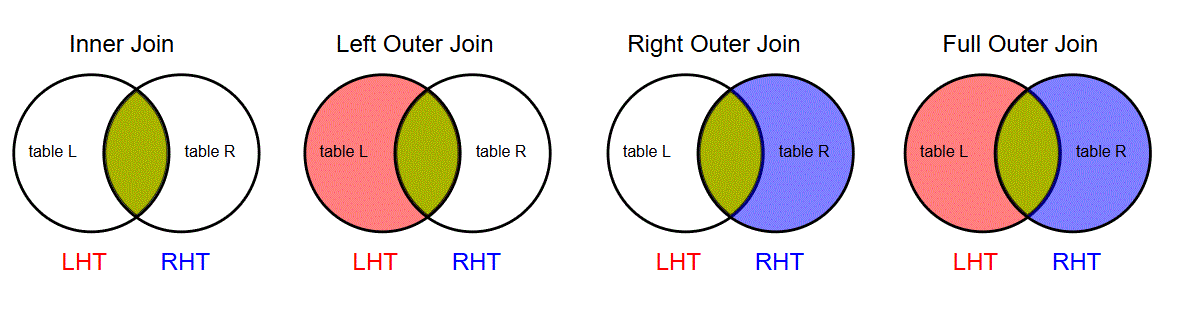
There are three matching (join) condition variants:
NATURAL: the tuples of the pair match if they agree (have the same value) on ALL of the attributes with the same name, suppressing duplicate attributesUSING(attributes): the tuples of the pair match if they agree on the listed attributes, suppressing duplicate attributesONpredicate: the tuples of the pair match if they satisfy the given logical predicate expression.
Some systems have a CROSS JOIN which corresponds to the Cartesian product.
12.2. Join syntax variants#
The syntax for variants of a joined table expression
<lht> NATURAL [INNER] JOIN <rht>
<lht> NATURAL [LEFT|RIGHT|FULL] [OUTER] JOIN <rht>
<lht> [INNER] JOIN <rht> USING(<attributes>)
<lht> [LEFT|RIGHT|FULL] [OUTER] JOIN USING(<attributes>)
<lht> [INNER] JOIN <rht> ON <condition>
<lht> [LEFT|RIGHT|FULL] [OUTER] JOIN <rht> ON <predicate_condition>
where lht and rht denote the left hand side and right hand side table references.
%%isql
SELECT *
FROM instructor NATURAL INNER JOIN teaches;
| ID | name | dept_name | salary | course_id | sec_id | semester | year | |
|---|---|---|---|---|---|---|---|---|
| 0 | 10101 | Srinivasan | Comp. Sci. | 65000.00 | CS-101 | 1 | Fall | 2009 |
| 1 | 10101 | Srinivasan | Comp. Sci. | 65000.00 | CS-315 | 1 | Spring | 2010 |
| 2 | 10101 | Srinivasan | Comp. Sci. | 65000.00 | CS-347 | 1 | Fall | 2009 |
| 3 | 12121 | Wu | Finance | 90000.00 | FIN-201 | 1 | Spring | 2010 |
| 4 | 15151 | Mozart | Music | 40000.00 | MU-199 | 1 | Spring | 2010 |
| 5 | 22222 | Einstein | Physics | 95000.00 | PHY-101 | 1 | Fall | 2009 |
| 6 | 32343 | El Said | History | 60000.00 | HIS-351 | 1 | Spring | 2010 |
| 7 | 45565 | Katz | Comp. Sci. | 75000.00 | CS-101 | 1 | Spring | 2010 |
| 8 | 45565 | Katz | Comp. Sci. | 75000.00 | CS-319 | 1 | Spring | 2010 |
| 9 | 76766 | Crick | Biology | 72000.00 | BIO-101 | 1 | Summer | 2009 |
| 10 | 76766 | Crick | Biology | 72000.00 | BIO-301 | 1 | Summer | 2010 |
| 11 | 83821 | Brandt | Comp. Sci. | 92000.00 | CS-190 | 1 | Spring | 2009 |
| 12 | 83821 | Brandt | Comp. Sci. | 92000.00 | CS-190 | 2 | Spring | 2009 |
| 13 | 83821 | Brandt | Comp. Sci. | 92000.00 | CS-319 | 2 | Spring | 2010 |
| 14 | 98345 | Kim | Elec. Eng. | 80000.00 | EE-181 | 1 | Spring | 2009 |
%%isql
SELECT *
FROM instructor INNER JOIN teaches USING(id);
| ID | name | dept_name | salary | course_id | sec_id | semester | year | |
|---|---|---|---|---|---|---|---|---|
| 0 | 10101 | Srinivasan | Comp. Sci. | 65000.00 | CS-101 | 1 | Fall | 2009 |
| 1 | 10101 | Srinivasan | Comp. Sci. | 65000.00 | CS-315 | 1 | Spring | 2010 |
| 2 | 10101 | Srinivasan | Comp. Sci. | 65000.00 | CS-347 | 1 | Fall | 2009 |
| 3 | 12121 | Wu | Finance | 90000.00 | FIN-201 | 1 | Spring | 2010 |
| 4 | 15151 | Mozart | Music | 40000.00 | MU-199 | 1 | Spring | 2010 |
| 5 | 22222 | Einstein | Physics | 95000.00 | PHY-101 | 1 | Fall | 2009 |
| 6 | 32343 | El Said | History | 60000.00 | HIS-351 | 1 | Spring | 2010 |
| 7 | 45565 | Katz | Comp. Sci. | 75000.00 | CS-101 | 1 | Spring | 2010 |
| 8 | 45565 | Katz | Comp. Sci. | 75000.00 | CS-319 | 1 | Spring | 2010 |
| 9 | 76766 | Crick | Biology | 72000.00 | BIO-101 | 1 | Summer | 2009 |
| 10 | 76766 | Crick | Biology | 72000.00 | BIO-301 | 1 | Summer | 2010 |
| 11 | 83821 | Brandt | Comp. Sci. | 92000.00 | CS-190 | 1 | Spring | 2009 |
| 12 | 83821 | Brandt | Comp. Sci. | 92000.00 | CS-190 | 2 | Spring | 2009 |
| 13 | 83821 | Brandt | Comp. Sci. | 92000.00 | CS-319 | 2 | Spring | 2010 |
| 14 | 98345 | Kim | Elec. Eng. | 80000.00 | EE-181 | 1 | Spring | 2009 |
%%isql
SELECT *
FROM instructor INNER JOIN teaches ON instructor.id = teaches.id;
| ID | name | dept_name | salary | ID | course_id | sec_id | semester | year | |
|---|---|---|---|---|---|---|---|---|---|
| 0 | 10101 | Srinivasan | Comp. Sci. | 65000.00 | 10101 | CS-101 | 1 | Fall | 2009 |
| 1 | 10101 | Srinivasan | Comp. Sci. | 65000.00 | 10101 | CS-315 | 1 | Spring | 2010 |
| 2 | 10101 | Srinivasan | Comp. Sci. | 65000.00 | 10101 | CS-347 | 1 | Fall | 2009 |
| 3 | 12121 | Wu | Finance | 90000.00 | 12121 | FIN-201 | 1 | Spring | 2010 |
| 4 | 15151 | Mozart | Music | 40000.00 | 15151 | MU-199 | 1 | Spring | 2010 |
| 5 | 22222 | Einstein | Physics | 95000.00 | 22222 | PHY-101 | 1 | Fall | 2009 |
| 6 | 32343 | El Said | History | 60000.00 | 32343 | HIS-351 | 1 | Spring | 2010 |
| 7 | 45565 | Katz | Comp. Sci. | 75000.00 | 45565 | CS-101 | 1 | Spring | 2010 |
| 8 | 45565 | Katz | Comp. Sci. | 75000.00 | 45565 | CS-319 | 1 | Spring | 2010 |
| 9 | 76766 | Crick | Biology | 72000.00 | 76766 | BIO-101 | 1 | Summer | 2009 |
| 10 | 76766 | Crick | Biology | 72000.00 | 76766 | BIO-301 | 1 | Summer | 2010 |
| 11 | 83821 | Brandt | Comp. Sci. | 92000.00 | 83821 | CS-190 | 1 | Spring | 2009 |
| 12 | 83821 | Brandt | Comp. Sci. | 92000.00 | 83821 | CS-190 | 2 | Spring | 2009 |
| 13 | 83821 | Brandt | Comp. Sci. | 92000.00 | 83821 | CS-319 | 2 | Spring | 2010 |
| 14 | 98345 | Kim | Elec. Eng. | 80000.00 | 98345 | EE-181 | 1 | Spring | 2009 |
%%isql
SELECT *
FROM instructor NATURAL LEFT OUTER JOIN teaches;
| ID | name | dept_name | salary | course_id | sec_id | semester | year | |
|---|---|---|---|---|---|---|---|---|
| 0 | 10101 | Srinivasan | Comp. Sci. | 65000.00 | CS-101 | 1 | Fall | 2009 |
| 1 | 10101 | Srinivasan | Comp. Sci. | 65000.00 | CS-315 | 1 | Spring | 2010 |
| 2 | 10101 | Srinivasan | Comp. Sci. | 65000.00 | CS-347 | 1 | Fall | 2009 |
| 3 | 12121 | Wu | Finance | 90000.00 | FIN-201 | 1 | Spring | 2010 |
| 4 | 15151 | Mozart | Music | 40000.00 | MU-199 | 1 | Spring | 2010 |
| 5 | 22222 | Einstein | Physics | 95000.00 | PHY-101 | 1 | Fall | 2009 |
| 6 | 32343 | El Said | History | 60000.00 | HIS-351 | 1 | Spring | 2010 |
| 7 | 33456 | Gold | Physics | 87000.00 | None | None | None | None |
| 8 | 45565 | Katz | Comp. Sci. | 75000.00 | CS-101 | 1 | Spring | 2010 |
| 9 | 45565 | Katz | Comp. Sci. | 75000.00 | CS-319 | 1 | Spring | 2010 |
| 10 | 58583 | Califieri | History | 62000.00 | None | None | None | None |
| 11 | 76543 | Singh | Finance | 80000.00 | None | None | None | None |
| 12 | 76766 | Crick | Biology | 72000.00 | BIO-101 | 1 | Summer | 2009 |
| 13 | 76766 | Crick | Biology | 72000.00 | BIO-301 | 1 | Summer | 2010 |
| 14 | 83821 | Brandt | Comp. Sci. | 92000.00 | CS-190 | 1 | Spring | 2009 |
| 15 | 83821 | Brandt | Comp. Sci. | 92000.00 | CS-190 | 2 | Spring | 2009 |
| 16 | 83821 | Brandt | Comp. Sci. | 92000.00 | CS-319 | 2 | Spring | 2010 |
| 17 | 98345 | Kim | Elec. Eng. | 80000.00 | EE-181 | 1 | Spring | 2009 |
%%isql --dialect mysql
SELECT *
FROM instructor NATURAL RIGHT OUTER JOIN teaches;
| ID | course_id | sec_id | semester | year | name | dept_name | salary | |
|---|---|---|---|---|---|---|---|---|
| 0 | 76766 | BIO-101 | 1 | Summer | 2009 | Crick | Biology | 72000.00 |
| 1 | 76766 | BIO-301 | 1 | Summer | 2010 | Crick | Biology | 72000.00 |
| 2 | 10101 | CS-101 | 1 | Fall | 2009 | Srinivasan | Comp. Sci. | 65000.00 |
| 3 | 45565 | CS-101 | 1 | Spring | 2010 | Katz | Comp. Sci. | 75000.00 |
| 4 | 83821 | CS-190 | 1 | Spring | 2009 | Brandt | Comp. Sci. | 92000.00 |
| 5 | 83821 | CS-190 | 2 | Spring | 2009 | Brandt | Comp. Sci. | 92000.00 |
| 6 | 10101 | CS-315 | 1 | Spring | 2010 | Srinivasan | Comp. Sci. | 65000.00 |
| 7 | 45565 | CS-319 | 1 | Spring | 2010 | Katz | Comp. Sci. | 75000.00 |
| 8 | 83821 | CS-319 | 2 | Spring | 2010 | Brandt | Comp. Sci. | 92000.00 |
| 9 | 10101 | CS-347 | 1 | Fall | 2009 | Srinivasan | Comp. Sci. | 65000.00 |
| 10 | 98345 | EE-181 | 1 | Spring | 2009 | Kim | Elec. Eng. | 80000.00 |
| 11 | 12121 | FIN-201 | 1 | Spring | 2010 | Wu | Finance | 90000.00 |
| 12 | 32343 | HIS-351 | 1 | Spring | 2010 | El Said | History | 60000.00 |
| 13 | 15151 | MU-199 | 1 | Spring | 2010 | Mozart | Music | 40000.00 |
| 14 | 22222 | PHY-101 | 1 | Fall | 2009 | Einstein | Physics | 95000.00 |
%%isql
SELECT *
FROM teaches NATURAL LEFT OUTER JOIN instructor;
| ID | course_id | sec_id | semester | year | name | dept_name | salary | |
|---|---|---|---|---|---|---|---|---|
| 0 | 76766 | BIO-101 | 1 | Summer | 2009 | Crick | Biology | 72000.00 |
| 1 | 76766 | BIO-301 | 1 | Summer | 2010 | Crick | Biology | 72000.00 |
| 2 | 10101 | CS-101 | 1 | Fall | 2009 | Srinivasan | Comp. Sci. | 65000.00 |
| 3 | 45565 | CS-101 | 1 | Spring | 2010 | Katz | Comp. Sci. | 75000.00 |
| 4 | 83821 | CS-190 | 1 | Spring | 2009 | Brandt | Comp. Sci. | 92000.00 |
| 5 | 83821 | CS-190 | 2 | Spring | 2009 | Brandt | Comp. Sci. | 92000.00 |
| 6 | 10101 | CS-315 | 1 | Spring | 2010 | Srinivasan | Comp. Sci. | 65000.00 |
| 7 | 45565 | CS-319 | 1 | Spring | 2010 | Katz | Comp. Sci. | 75000.00 |
| 8 | 83821 | CS-319 | 2 | Spring | 2010 | Brandt | Comp. Sci. | 92000.00 |
| 9 | 10101 | CS-347 | 1 | Fall | 2009 | Srinivasan | Comp. Sci. | 65000.00 |
| 10 | 98345 | EE-181 | 1 | Spring | 2009 | Kim | Elec. Eng. | 80000.00 |
| 11 | 12121 | FIN-201 | 1 | Spring | 2010 | Wu | Finance | 90000.00 |
| 12 | 32343 | HIS-351 | 1 | Spring | 2010 | El Said | History | 60000.00 |
| 13 | 15151 | MU-199 | 1 | Spring | 2010 | Mozart | Music | 40000.00 |
| 14 | 22222 | PHY-101 | 1 | Fall | 2009 | Einstein | Physics | 95000.00 |
%%isql --dialect ansi

SELECT *
FROM instructor NATURAL FULL OUTER JOIN teaches;
12.2.1. Foreign key references and joins#
Foreign key references easily induce simple join expressions for combining information from multiple tables
For example, since the table teaches has the foreign key reference
id REFERENCES instructor(id)
the (most likely intended) teaches-instructor joined table would be
teaches RIGHT OUTER JOIN instructor USING(id)
13. Compound SQL statements: set operations on tables#
Compound SQL statements are constructed by applying (binary) set-like operators on table operands, where those operands are often the result tables of sub-queries.
Suppose we have two tables whose attributes can be put into 1-1 correspondence
with respect to type (and name if named).
Such tables are called union-compatible
since we can take the (multi-)set union of their tuples.
In addition, we can also find their set intersection and set difference.
To this end, we use the UNION, INTERSECT, and EXCEPT operators in SQL.
Moreover, when considering each table as a bag, we can take the bag union,
intersection, and difference of union-compatible (bag) tables.
Recall, that a bag retains duplicates which are suppressed in a set.
We use the UNION ALL, INTERSECT ALL, and EXCEPT ALL operators in SQL
to retain duplicates.
Caution: UNION suppresses duplicate tuples from its result table by default.
Some database servers do not implement all these compound operators.
%%isql
SELECT course_id FROM teaches WHERE year = 2010;
| course_id | |
|---|---|
| 0 | BIO-301 |
| 1 | CS-101 |
| 2 | CS-315 |
| 3 | CS-319 |
| 4 | CS-319 |
| 5 | FIN-201 |
| 6 | HIS-351 |
| 7 | MU-199 |
%%isql
-- # Find the ids of courses taught in 2009 or 2010

SELECT course_id FROM teaches WHERE year = 2009
UNION
SELECT course_id FROM teaches WHERE year = 2010;
| course_id | |
|---|---|
| 0 | BIO-101 |
| 1 | CS-101 |
| 2 | CS-190 |
| 3 | CS-347 |
| 4 | EE-181 |
| 5 | PHY-101 |
| 6 | BIO-301 |
| 7 | CS-315 |
| 8 | CS-319 |
| 9 | FIN-201 |
| 10 | HIS-351 |
| 11 | MU-199 |
%%isql
-- # Find the ids of courses taught in 2009 or 2010 without suppressing duplicates

SELECT course_id FROM teaches WHERE year = 2009
UNION ALL
SELECT course_id FROM teaches WHERE year = 2010;
| course_id | |
|---|---|
| 0 | BIO-101 |
| 1 | CS-101 |
| 2 | CS-190 |
| 3 | CS-190 |
| 4 | CS-347 |
| 5 | EE-181 |
| 6 | PHY-101 |
| 7 | BIO-301 |
| 8 | CS-101 |
| 9 | CS-315 |
| 10 | CS-319 |
| 11 | CS-319 |
| 12 | FIN-201 |
| 13 | HIS-351 |
| 14 | MU-199 |
Is the result sorted? (why?)
%%isql --dialect sqlite
-- # Find the ids of courses taught in 2009 and 2010

SELECT course_id FROM teaches WHERE year = 2009
INTERSECT
SELECT course_id FROM teaches WHERE year = 2010;
%%isql
SELECT course_id FROM teaches WHERE year = 2009;
| course_id | |
|---|---|
| 0 | BIO-101 |
| 1 | CS-101 |
| 2 | CS-190 |
| 3 | CS-190 |
| 4 | CS-347 |
| 5 | EE-181 |
| 6 | PHY-101 |
%%isql
SELECT course_id FROM teaches WHERE year = 2010;
| course_id | |
|---|---|
| 0 | BIO-301 |
| 1 | CS-101 |
| 2 | CS-315 |
| 3 | CS-319 |
| 4 | CS-319 |
| 5 | FIN-201 |
| 6 | HIS-351 |
| 7 | MU-199 |
%%isql --dialect sqlite
-- # Find the ids of courses taught in 2009 but not 2010

SELECT course_id FROM teaches WHERE year = 2009
EXCEPT
SELECT course_id FROM teaches WHERE year = 2010;
%%isql
SELECT course_id FROM teaches WHERE year = 2009 and year != 2010;
| course_id | |
|---|---|
| 0 | BIO-101 |
| 1 | CS-101 |
| 2 | CS-190 |
| 3 | CS-190 |
| 4 | CS-347 |
| 5 | EE-181 |
| 6 | PHY-101 |
One can get the INTERSECT and EXCEPT functionality using the
[NOT] IN <subquery>
nested subquery construct, which is discussed further below (eg. to find table intersections in MySQL).
14. Nested subqueries#
Since the result of a SQL query is a table, we can compose queries to construct highly expressive queries.
SQL sub-queries may appear anywhere a table reference may be used in a SQL query statement, e.g.
in a
FROMclauseas an operand of a
UNION,INTERSECT,EXCEPTcompound operatoras the right-hand-side (RHS) operand of the
INoperatoras the operand of the
EXISTSandUNIQUEoperatorsanywhere a scalar value may be used provided the subquery is a scalar subquery
14.2. Filtering outer tuples using boolean predicates on sub-query result tables#
14.2.1. Filtering based on value-operator-table predicates#
To filter input tuples based on membership of the tuple’s value (either scalar or a sub-tuple) in a collection of values or table, we can use the IN logical operator to make a boolean predicate
<value> [NOT] IN (<tuple_values>)
<value> [NOT] IN <SQL_subquery>
The LHS tuple should be union-compatible with the RHS collection of values or table.
%%isql
-- # Find the attributes of instructors of the History and Biology department.

SELECT *
FROM instructor
WHERE dept_name IN ('History', 'Biology');
| ID | name | dept_name | salary | |
|---|---|---|---|---|
| 0 | 76766 | Crick | Biology | 72000.00 |
| 1 | 32343 | El Said | History | 60000.00 |
| 2 | 58583 | Califieri | History | 62000.00 |
%%isql
-- # Find the unique ids of courses taught in 2009 and 2010

SELECT DISTINCT course_id
FROM teaches
WHERE year=2009 AND
      course_id IN (SELECT course_id
                    FROM teaches
                    WHERE year=2010);
| course_id | |
|---|---|
| 0 | CS-101 |
%%isql
-- # Find the unique student ids that took a class taught by an instructor named 'Mozart'

SELECT DISTINCT id
FROM takes
WHERE (course_id, semester, year) IN (SELECT course_id, semester, year
                                       FROM teaches, instructor
                                       WHERE teaches.id = instructor.id AND
                                            name = 'Mozart');
| id | |
|---|---|
| 0 | 55739 |
%%isql
-- # Solving the previous query without nested subqueries

SELECT DISTINCT takes.id
FROM takes, teaches, instructor
WHERE takes.course_id = teaches.course_id AND
      takes.semester = teaches.semester AND
      takes.year = teaches.year AND
      teaches.id = instructor.id AND instructor.name = 'Mozart';
| id | |
|---|---|
| 0 | 55739 |
Often the former is easier to comprehend, debug, and analyze than the latter.
Furthermore, SQL provides additional predicate constructs for comparing a value with values in a sub-query’s result table
using SOME and ALL modifiers to the relational comparison operators <, >, =, etc
%%isql
SELECT * FROM instructor ORDER BY dept_name, salary;
| ID | name | dept_name | salary | |
|---|---|---|---|---|
| 0 | 76766 | Crick | Biology | 72000.00 |
| 1 | 10101 | Srinivasan | Comp. Sci. | 65000.00 |
| 2 | 45565 | Katz | Comp. Sci. | 75000.00 |
| 3 | 83821 | Brandt | Comp. Sci. | 92000.00 |
| 4 | 98345 | Kim | Elec. Eng. | 80000.00 |
| 5 | 76543 | Singh | Finance | 80000.00 |
| 6 | 12121 | Wu | Finance | 90000.00 |
| 7 | 32343 | El Said | History | 60000.00 |
| 8 | 58583 | Califieri | History | 62000.00 |
| 9 | 15151 | Mozart | Music | 40000.00 |
| 10 | 33456 | Gold | Physics | 87000.00 |
| 11 | 22222 | Einstein | Physics | 95000.00 |
%%isql --dialect mysql
-- # Find the unique instructor names with salary greater than some instructor in 'Physics'.

SELECT DISTINCT name
FROM instructor
WHERE salary > SOME(SELECT salary
                     FROM instructor
                     WHERE dept_name = 'Physics');
| name | |
|---|---|
| 0 | Wu |
| 1 | Einstein |
| 2 | Brandt |
%%isql
-- # Find the unique instructor names with salary greater than some instructor in 'Physics'.

SELECT DISTINCT R.name
FROM instructor as R, instructor as S
WHERE R.salary > S.salary and S.dept_name = 'Physics';
| name | |
|---|---|
| 0 | Wu |
| 1 | Einstein |
| 2 | Brandt |
%%isql --dialect mysql
-- # Find the unique instructor names with salary greater than all instructors in 'Physics'.

SELECT DISTINCT name
FROM instructor
WHERE salary > ALL(SELECT salary
                     FROM instructor
                     WHERE dept_name = 'Physics');
| name |
|---|
14.2.2. Filtering using table-wise predicates#
Often, in correlated nested sub-queries,
we would like to filter outer tuples based on whether the result table
of the correlated nested sub-query (which is a function of outer tuples)
is empty or contains duplicates.
To accomplish this, we use the EXISTS and
UNIQUE boolean operators in SQL
EXISTSto test the whether the result table of a sub-query is empty or not.UNIQUEto test whether the result table of a nested sub-query has duplicate tuples or not.
[NOT] EXISTS (<subquery>)
[NOT] UNIQUE (<subquery>)
%%isql --dialect sqlite
-- # Find the students that took ALL Physics courses

SELECT DISTINCT S.name
FROM student AS S
WHERE NOT EXISTS (SELECT course_id
                  FROM course
                  WHERE dept_name = 'Physics'

                  EXCEPT

                  SELECT course_id
                  FROM takes AS T
                  WHERE T.id = S.id);
%%isql --dialect mysql
-- # Find the students that took ALL Physics courses

SELECT DISTINCT S.name
FROM student AS S
WHERE NOT EXISTS (SELECT course_id
                  FROM course
                  WHERE dept_name = 'Physics'
                        AND course_id NOT IN
                               (SELECT course_id
                                FROM takes AS T
                                WHERE T.id = S.id));
| name | |
|---|---|
| 0 | Peltier |
The query above implements the relational division operator between two tables, where the quotient table is defined to be the maximal table whose cross join with the divisor table \(S\) is contained in the dividend table \(R\), ie
This is analogous to integer division. For the example query here, the dividend and divisor relations are
%%isql
-- # the dividend relation

SELECT name, course_id FROM student, takes WHERE student.id = takes.id ORDER BY name, course_id;
| name | course_id | |
|---|---|---|
| 0 | Aoi | EE-181 |
| 1 | Bourikas | CS-101 |
| 2 | Bourikas | CS-315 |
| 3 | Brandt | HIS-351 |
| 4 | Brown | CS-101 |
| 5 | Brown | CS-319 |
| 6 | Chavez | FIN-201 |
| 7 | Levy | CS-101 |
| 8 | Levy | CS-101 |
| 9 | Levy | CS-319 |
| 10 | Peltier | PHY-101 |
| 11 | Sanchez | MU-199 |
| 12 | Shankar | CS-101 |
| 13 | Shankar | CS-190 |
| 14 | Shankar | CS-315 |
| 15 | Shankar | CS-347 |
| 16 | Tanaka | BIO-101 |
| 17 | Tanaka | BIO-301 |
| 18 | Williams | CS-101 |
| 19 | Williams | CS-190 |
| 20 | Zhang | CS-101 |
| 21 | Zhang | CS-347 |
%%isql
-- # the divisor relation

SELECT DISTINCT course_id FROM course WHERE dept_name = 'Physics' ORDER BY course_id;
| course_id | |
|---|---|
| 0 | PHY-101 |
14.3. Scalar sub-queries#
Sub-queries whose result table has a single tuple with a single attribute are called scalar sub-queries.
In general, scalar sub-queries may appear anywhere a scalar is allowed in SQL statements.
Often scalar sub-queries are correlated.
%%isql
-- # Find the names and their number of instructors of all departments

SELECT dept_name, (SELECT COUNT(*)
                   FROM instructor
                   WHERE department.dept_name = instructor.dept_name)
                  AS num_instructors
FROM department;
| dept_name | num_instructors | |
|---|---|---|
| 0 | Biology | 1 |
| 1 | Comp. Sci. | 3 |
| 2 | Elec. Eng. | 1 |
| 3 | Finance | 2 |
| 4 | History | 2 |
| 5 | Music | 1 |
| 6 | Physics | 2 |
%%isql
SELECT dept_name, COUNT(id)  AS no_instructor
FROM department NATURAL LEFT OUTER JOIN instructor
GROUP BY dept_name;
| dept_name | no_instructor | |
|---|---|---|
| 0 | Biology | 1 |
| 1 | Comp. Sci. | 3 |
| 2 | Elec. Eng. | 1 |
| 3 | Finance | 2 |
| 4 | History | 2 |
| 5 | Music | 1 |
| 6 | Physics | 2 |
15. Derived tables#
Derived tables are result tables of table expressions (SQL queries).
15.1. Views#
Persistent database objects (e.g. tables) exist in the database until a client explicitly discards (drops) them.
A view is a persistent database object that is a named derived table, defined with a SQL statement
CREATE VIEW [IF NOT EXISTS] <view_name>(<attributes>) AS <query>;
By default, the derived table represented by a view is not materialized (have its tuples stored). Instead, before evaluating a query, the server replaces each view reference with its defining SQL query, (i.e. effectively a lexical expansion of a macro mechanism).
The decision of whether to materializing a view or not requires an analysis of the performance benefits due to evaluating a more complex SQL query (due to replacing a view reference with its defining sub-query) vs the storage and time costs due to storing and updating the stored table materializing the view whenever the view’s referenced tables are updated.
Views are useful since they
loosen the coupling of clients from the actual schema of the tables used to define them i.e. implement the view-independence
present a database schema customizable to the client, thus reducing the database complexity visible by each client
facilitate code-reuse
Views are also useful from a security perspective, since when invoked by a client
they execute (by default) using the access privileges of the view’s creator agent
(i.e. the agent of the invoking client does not need to have access privileges to the view’s underlying tables).
This is analogous to the setuid permissions in Unix filesystems.
%%isql --dialect sqlite

CREATE VIEW IF NOT EXISTS physics_faculty(fid, name, dept) AS
  SELECT id, name, dept_name
  FROM instructor
  WHERE dept_name = 'Physics';
%%isql --dialect mysql

CREATE OR REPLACE VIEW physics_faculty(fid, name, dept) AS
  SELECT id, name, dept_name
  FROM instructor
  WHERE dept_name = 'Physics';
%%isql
SELECT * FROM physics_faculty;
| fid | name | dept | |
|---|---|---|---|
| 0 | 22222 | Einstein | Physics |
| 1 | 33456 | Gold | Physics |
%%isql
DROP VIEW physics_faculty;
16. Transient tables and the WITH clause#
Transient tables are named derived tables whose lexical and temporal scope is limited to that of a single SQL statement.
16.1. Common Table Expressions#
A common table expression (CTE) is a named transient derived table corresponding to the result of a SQL query, which upon declared in a statement, it can be subsequently referenced within the same statement.
<table_name>(<attributes>) AS <SQL_query_statement>
A WITH clause creates transient derived tables using a sequence of CTEs.
A CTE may contain table references to other CTEs that preceded it in the WITH clause.
A SQL statement may have a WITH clause; if it does. then it
may contain references to transient tables defined in its WITH clause
WITH
<CTEs>
<SQL_query_statement>;
%%isql
-- # Find the names of the highest payed instructors

WITH
    HighestSalary(value) AS (SELECT MAX(salary)
                             FROM instructor)
SELECT name
FROM instructor, HighestSalary
WHERE instructor.salary = HighestSalary.value;
| name | |
|---|---|
| 0 | Einstein |
17. Temporary tables#
A temporary table is like an ordinary base table, except that
it is effectively materialized anew in each session, and
it is automatically garbage collected once it is no longer used
by a client
CREATE TEMPORARY TABLE <tablename> ...
%%isql
DROP TABLE IF EXISTS _course;
CREATE TEMPORARY TABLE IF NOT EXISTS _course AS
    SELECT * FROM course;
Let us create two temporary tables to try some data modification statements in below.
%%isql
-- # Create a temporary table for teaches
DROP TABLE IF EXISTS _teaches;

CREATE TEMPORARY TABLE IF NOT EXISTS _teaches AS
   SELECT * FROM teaches WHERE id is NULL;
%%isql
-- # Create a temporary table _instructor by cloning the instructor table,
-- # and then adding a new column to it, named 'zipcode' with default value '21250'
DROP TABLE IF EXISTS _instructor;

CREATE TEMPORARY TABLE _instructor AS
   SELECT * FROM instructor;

ALTER TABLE _instructor ADD zipcode CHAR(5) DEFAULT '21250';
%isql select * from _instructor;
| ID | name | dept_name | salary | zipcode | |
|---|---|---|---|---|---|
| 0 | 10101 | Srinivasan | Comp. Sci. | 65000.00 | 21250 |
| 1 | 12121 | Wu | Finance | 90000.00 | 21250 |
| 2 | 15151 | Mozart | Music | 40000.00 | 21250 |
| 3 | 22222 | Einstein | Physics | 95000.00 | 21250 |
| 4 | 32343 | El Said | History | 60000.00 | 21250 |
| 5 | 33456 | Gold | Physics | 87000.00 | 21250 |
| 6 | 45565 | Katz | Comp. Sci. | 75000.00 | 21250 |
| 7 | 58583 | Califieri | History | 62000.00 | 21250 |
| 8 | 76543 | Singh | Finance | 80000.00 | 21250 |
| 9 | 76766 | Crick | Biology | 72000.00 | 21250 |
| 10 | 83821 | Brandt | Comp. Sci. | 92000.00 | 21250 |
| 11 | 98345 | Kim | Elec. Eng. | 80000.00 | 21250 |
18. Modifying the tuples of a table#
18.1. Inserting tuples#
To append tuples to a table, we use one of the following variants of the INSERT SQL statement:
INSERT INTO <table_name> VALUES(<list_of_values>);
INSERT INTO <table_name>(<list_of_attributes>) VALUES(<list_of_values>);
INSERT INTO <table_name> <SQL_SELECT_query_statement> ;
The attributes and values are in left-to-right 1-1 correspondence. For the 1st variant, the left-to-right order of the attributes is the order defined during the table creation.
%%isql
SELECT * FROM _teaches;
| ID | course_id | sec_id | semester | year |
|---|
%%isql --dialect sqlite|mysql
INSERT INTO _teaches VALUES(1, 'CS-101', 1, 'Fall', 2009);
INSERT INTO _teaches VALUES(1, 'CS-101', 2, 'Spring', 2010);
INSERT INTO _teaches (year, semester, course_id, sec_id, id) VALUES(2010, 'Spring','CS-102', 1, 1);

SELECT * FROM _teaches WHERE id=1;
| ID | course_id | sec_id | semester | year | |
|---|---|---|---|---|---|
| 0 | 1 | CS-101 | 1 | Fall | 2009 |
| 1 | 1 | CS-101 | 2 | Spring | 2010 |
| 2 | 1 | CS-102 | 1 | Spring | 2010 |
18.1.1. Transition tables#
The standard operational semantics of a programming assignment statement \(x \leftarrow f(x)\) is to first compute the value \(f(x)\) and then assign it to \(x\); here \(f(x)\) is any expression that depends on \(x\).
We wish these semantics apply even when \(x\) is a table variable and \(f(x)\) is a table expression (SQL statement that evaluates to a table). In database servers, this is accomplished via transition tables.
Each INSERT statement is associated with a transition table,
which is the transient collection of tuples to be inserted in the table
referenced by the INSERT statement.
The database server first computes the transition table, and then inserts the transition tuples into the referenced table. Servers often implement transition tables using a shadowing technique.
The DELETE and UPDATE SQL statements also have associated transition tables as we will discuss below.
%%isql
SELECT * FROM _teaches;
| ID | course_id | sec_id | semester | year | |
|---|---|---|---|---|---|
| 0 | 1 | CS-101 | 1 | Fall | 2009 |
| 1 | 1 | CS-101 | 2 | Spring | 2010 |
| 2 | 1 | CS-102 | 1 | Spring | 2010 |
To append tuples from the result of a subquery, use this variant
%%isql --dialect sqlite
-- # Insert the tuples of teaches into _teaches

INSERT INTO _teaches
  SELECT * FROM _teaches;
%%isql --dialect mysql
-- # Insert the tuples of teaches into _teaches

-- # MySQL does not allow multiple references to a table

INSERT INTO _teaches
  SELECT * FROM _teaches;
%%isql --dialect mysql
-- # Insert the tuples of teaches into _teaches

-- # MySQL does not allow multiple references to a table
-- # a workaround is to use a temporary table

DROP TABLE IF EXISTS _teaches2;
CREATE TEMPORARY TABLE _teaches2 AS SELECT * FROM _teaches;

INSERT INTO _teaches
  SELECT * FROM _teaches2;

DROP TABLE _teaches2;
%%isql
SELECT * FROM _teaches;
| ID | course_id | sec_id | semester | year | |
|---|---|---|---|---|---|
| 0 | 1 | CS-101 | 1 | Fall | 2009 |
| 1 | 1 | CS-101 | 2 | Spring | 2010 |
| 2 | 1 | CS-102 | 1 | Spring | 2010 |
| 3 | 1 | CS-101 | 1 | Fall | 2009 |
| 4 | 1 | CS-101 | 2 | Spring | 2010 |
| 5 | 1 | CS-102 | 1 | Spring | 2010 |
18.2. Deleting tuples#
To remove tuples from a table, use the SQL statement
DELETE FROM <table>
[WHERE <selection_predicate>];
Caution: without a WHERE clause all tuples from the table are deleted.
Specify a WHERE clause to delete certain tuples (based on some selection predicate) from a table.
Each DELETE statement has an associated transition table, which consists of the tuples to be deleted.
The database server first computes the DELETE’s transition table, and then removes those transition table
tuples from the referenced table.
%%isql
-- # Delete rows with a NULL section from _teaches

DELETE FROM _teaches
WHERE sec_id IS NULL;
%%isql
SELECT * FROM _instructor;
| ID | name | dept_name | salary | zipcode | |
|---|---|---|---|---|---|
| 0 | 10101 | Srinivasan | Comp. Sci. | 65000.00 | 21250 |
| 1 | 12121 | Wu | Finance | 90000.00 | 21250 |
| 2 | 15151 | Mozart | Music | 40000.00 | 21250 |
| 3 | 22222 | Einstein | Physics | 95000.00 | 21250 |
| 4 | 32343 | El Said | History | 60000.00 | 21250 |
| 5 | 33456 | Gold | Physics | 87000.00 | 21250 |
| 6 | 45565 | Katz | Comp. Sci. | 75000.00 | 21250 |
| 7 | 58583 | Califieri | History | 62000.00 | 21250 |
| 8 | 76543 | Singh | Finance | 80000.00 | 21250 |
| 9 | 76766 | Crick | Biology | 72000.00 | 21250 |
| 10 | 83821 | Brandt | Comp. Sci. | 92000.00 | 21250 |
| 11 | 98345 | Kim | Elec. Eng. | 80000.00 | 21250 |
%%isql
-- # Delete instructors whose department is 'Finance'

DELETE FROM _instructor
WHERE dept_name = 'Finance';
%isql SELECT * FROM _instructor
| ID | name | dept_name | salary | zipcode | |
|---|---|---|---|---|---|
| 0 | 10101 | Srinivasan | Comp. Sci. | 65000.00 | 21250 |
| 1 | 15151 | Mozart | Music | 40000.00 | 21250 |
| 2 | 22222 | Einstein | Physics | 95000.00 | 21250 |
| 3 | 32343 | El Said | History | 60000.00 | 21250 |
| 4 | 33456 | Gold | Physics | 87000.00 | 21250 |
| 5 | 45565 | Katz | Comp. Sci. | 75000.00 | 21250 |
| 6 | 58583 | Califieri | History | 62000.00 | 21250 |
| 7 | 76766 | Crick | Biology | 72000.00 | 21250 |
| 8 | 83821 | Brandt | Comp. Sci. | 92000.00 | 21250 |
| 9 | 98345 | Kim | Elec. Eng. | 80000.00 | 21250 |
%isql SELECT AVG(salary) FROM _instructor;
| AVG(salary) | |
|---|---|
| 0 | 72800.000000 |
%%isql --dialect sqlite
-- # Delete instructors whose salary is less than the average

DELETE FROM _instructor
WHERE salary < (SELECT AVG(salary) FROM _instructor);

-- # MySQL does not allow multiple references to a table
-- # a similar workaround to shown for INSERT could be done to for the DELETE
%isql SELECT * FROM _instructor
| ID | name | dept_name | salary | zipcode | |
|---|---|---|---|---|---|
| 0 | 22222 | Einstein | Physics | 95000.00 | 21250 |
| 1 | 33456 | Gold | Physics | 87000.00 | 21250 |
| 2 | 45565 | Katz | Comp. Sci. | 75000.00 | 21250 |
| 3 | 83821 | Brandt | Comp. Sci. | 92000.00 | 21250 |
| 4 | 98345 | Kim | Elec. Eng. | 80000.00 | 21250 |
18.3. Updating tuples#
To update some attributes of certain chosen tuples in a table use the SQL statement
UPDATE <table_name>
SET <list_of_attribute_name_=_expression>
[WHERE <selection_predicate>];
If the optional WHERE clause is missing then all of the referenced table’s tuples are updated.
Each UPDATE statement has an associated transition table of the tuples to be updated, and
the database server conceptually first computes the UPDATE’s transition table and then
updates those transition table tuples in table referenced by the UPDATE statement.
%%isql
-- # Double the salary of instructors with salary above 90K

UPDATE _instructor
SET salary = salary * 2,
    zipcode = '10000'
WHERE salary > 90000;
%%isql --dialect sqlite
-- # Double the salary of instructors with salary above 90K

UPDATE _instructor
    SET salary = salary * 2
WHERE salary < (SELECT AVG(salary) FROM _instructor);

-- # MySQL does not allow multiple references to a table
-- # a similar workaround to shown for INSERT could be done to for the INSERT
%%isql
SELECT * FROM _instructor;
| ID | name | dept_name | salary | zipcode | |
|---|---|---|---|---|---|
| 0 | 22222 | Einstein | Physics | 190000.00 | 10000 |
| 1 | 33456 | Gold | Physics | 174000.00 | 21250 |
| 2 | 45565 | Katz | Comp. Sci. | 150000.00 | 21250 |
| 3 | 83821 | Brandt | Comp. Sci. | 184000.00 | 10000 |
| 4 | 98345 | Kim | Elec. Eng. | 160000.00 | 21250 |
%%isql
-- # lets undo the last update

UPDATE _instructor
SET salary = salary / 2,
    zipcode = '21250'
WHERE salary > 2*90000;
%%isql
SELECT * FROM _instructor;
| ID | name | dept_name | salary | zipcode | |
|---|---|---|---|---|---|
| 0 | 22222 | Einstein | Physics | 95000.00 | 21250 |
| 1 | 33456 | Gold | Physics | 174000.00 | 21250 |
| 2 | 45565 | Katz | Comp. Sci. | 150000.00 | 21250 |
| 3 | 83821 | Brandt | Comp. Sci. | 92000.00 | 21250 |
| 4 | 98345 | Kim | Elec. Eng. | 160000.00 | 21250 |
19. Indexing to speedup searching tables#
Create an auxiliary data structure that supports finding tuples of a table that satisfy certain search predicates on a table’s attributes
CREATE [UNIQUE] INDEX [IF NOT EXISTS] <index_name> ON <table_name>(<attributes>);
DROP INDEX [IF EXISTS] <index_name>;
If the UNIQUE keyword is used then the index
rejects duplicate index entries (index attribute values).
%%isql
# setup table
DROP TABLE IF EXISTS _instructor;
CREATE TABLE _instructor AS SELECT * FROM instructor;
ALTER TABLE _instructor ADD zipcode CHAR(5) DEFAULT '21250';
%%isql --dialect sqlite

DROP INDEX IF EXISTS _instructor_zip_idx;
%%isql --dialect mysql
-- # MySQL does not support DROP INDEX IF EXISTS
-- DROP INDEX IF EXISTS _instructor_zip_idx ON _instructor;
-- DROP INDEX _instructor_zip_idx ON _instructor;
SELECT NULL;
| NULL | |
|---|---|
| 0 | None |
%%isql
-- # create a index on the attribute 'zipcode' of '_instructor'

CREATE INDEX _instructor_zip_idx ON _instructor(zipcode);
19.1. Cost-benefit of an index affects its usefulness#
Each one of indexes on a table is kept in sync as tuples in the indexed table are modified. The extra (storage and time) costs of maintaining an index in the face of modifications should in general be compensated by the performance benefits in evaluating SQL statements involving the indexed table.
To see if an index is used in evaluating a SQL statement, use the SQL EXPLAIN QUERY PLAN statement.
%%isql --dialect sqlite
-- # Examine a query plan to find out
-- # whether an index is useful to the server in executing a SQL statement
EXPLAIN QUERY PLAN
    SELECT name FROM _instructor WHERE zipcode = '21250' ORDER BY name;
plan = None
%%isql --dialect mysql --return-result plan

EXPLAIN ANALYZE
        SELECT name FROM _instructor WHERE zipcode = '21250' ORDER BY name;
if isinstance(plan, pd.DataFrame):
    for line in plan.loc[0]['EXPLAIN'].split('->'):
        print(line)
 Sort: _instructor.`name`  (cost=1.45 rows=12) (actual time=0.033..0.034 rows=12 loops=1)

 Filter: (_instructor.zipcode = '21250')  (cost=1.45 rows=12) (actual time=0.012..0.020 rows=12 loops=1)

 Table scan on _instructor  (cost=1.45 rows=12) (actual time=0.010..0.017 rows=12 loops=1)
%isql --dialect mysql DROP INDEX _instructor_zip_idx ON _instructor;
20. Fulltext queries#
Some SQL servers (e.g. MySQL) support natural language and boolean full text
searching on text-like attributes (e.g. VARCHAR, TEXT, etc).
To have the database server evaluate full-text search queries on a group of text-like attributes,
there should be a FULLTEXT index on that group of attributes.
The concatenation of the values of that group for attribute for each input tuple is considered the tuple’s “document”.
%%isql --dialect mysql
# lets setup a persistent base table _course table to play with

DROP TABLE IF EXISTS _course;
# DROP TABLE _course;
CREATE TABLE IF NOT EXISTS _course AS SELECT * FROM course
%%isql --dialect mysql
# SELECT NULL;
# ALTER TABLE _course DROP COLUMN syllabus;
# ALTER TABLE _course ADD COLUMN syllabus TEXT DEFAULT 'everybody SQLs;
SELECT * FROM _course LIMIT 1;
| course_id | title | dept_name | credits | |
|---|---|---|---|---|
| 0 | BIO-101 | Intro. to Biology | Biology | 4 |
%%isql --dialect mysql-skip
DROP INDEX IF EXISTS course_nlp_idx ON _course;
%%isql --dialect mysql
-- # Add a new TEXT column to _courses

ALTER TABLE _course ADD COLUMN syllabus VARCHAR(256)  DEFAULT 'all about SQL';
%%isql --dialect mysql
-- # Create a FULLTEXT index for natural languange and boolean full-text searches on
-- # the title and syllabus attributes (together

CREATE FULLTEXT INDEX course_nlp_idx ON _course(title, syllabus);

-- ALTER TABLE _course ADD FULLTEXT INDEX course_nlp_idx(title, syllabus);
We can then search the fulltext indexed group of attributes in three modes, using the MATCH function
MATCH(<attributes) AGAINST (<search_phrase> [<search_mode>])
<search_mode> :: IN NATURAL LANGUAGE MODE |
                 [IN NATURAL LANGUAGE MODE] WITH QUERY EXPANSION |
                 IN BOOLEAN MODE
which returns the relevance score of a tuple’s document (text in the group of referenced attributes of a tuple), where the relevance scores
are non-negative numbers
are computed based on word statistics (eg word counts) of a document, word statistics of the collection of all documents, as well as word statistics of documents conditioned on containing a word.
MySQL uses a variant of the TF-IDF relevance scoring method.
a relevance score value 0 indicates no relevance.
By default, the tuples in the result table are in decreasing sorted order of the relevance score of their documents.
%%isql --dialect mysql
-- # full-text query for 'databases' in the title+syllabus text document of _course tuples

SELECT *
FROM _course
WHERE MATCH (title, syllabus) AGAINST ('database' IN NATURAL LANGUAGE MODE);
| course_id | title | dept_name | credits | syllabus | |
|---|---|---|---|---|---|
| 0 | CS-347 | Database System Concepts | Comp. Sci. | 3 | all about SQL |
%%isql --dialect mysql
-- # Find course id, title, syllabus and relevance scores
-- # for courses with database in their title or syllabus
-- # as natural language

SELECT course_id, title, syllabus,
       MATCH (title, syllabus) AGAINST ('database' IN NATURAL LANGUAGE MODE) AS score
FROM _course
WHERE MATCH (title, syllabus) AGAINST ('database' IN NATURAL LANGUAGE MODE);
| course_id | title | syllabus | score | |
|---|---|---|---|---|
| 0 | CS-347 | Database System Concepts | all about SQL | 1.24087 |
MySQL uses the blind query expansion technique: perform the search twice, where the second search’s phrase is the original search phrase concatenated with the few most highly relevant documents from the 1st search.
%%isql --dialect mysql
-- # Search in natural language mode after query expansion of search expression

SELECT *
FROM _course
WHERE MATCH (title, syllabus) AGAINST ('database' WITH QUERY EXPANSION);
| course_id | title | dept_name | credits | syllabus | |
|---|---|---|---|---|---|
| 0 | CS-347 | Database System Concepts | Comp. Sci. | 3 | all about SQL |
| 1 | BIO-101 | Intro. to Biology | Biology | 4 | all about SQL |
| 2 | BIO-301 | Genetics | Biology | 4 | all about SQL |
| 3 | BIO-399 | Computational Biology | Biology | 3 | all about SQL |
| 4 | CS-101 | Intro. to Computer Science | Comp. Sci. | 4 | all about SQL |
| 5 | CS-190 | Game Design | Comp. Sci. | 4 | all about SQL |
| 6 | CS-315 | Robotics | Comp. Sci. | 3 | all about SQL |
| 7 | CS-319 | Image Processing | Comp. Sci. | 3 | all about SQL |
| 8 | EE-181 | Intro. to Digital Systems | Elec. Eng. | 3 | all about SQL |
| 9 | FIN-201 | Investment Banking | Finance | 3 | all about SQL |
| 10 | HIS-351 | World History | History | 3 | all about SQL |
| 11 | MU-199 | Music Video Production | Music | 3 | all about SQL |
| 12 | PHY-101 | Physical Principles | Physics | 4 | all about SQL |
MySQL also supports boolean full-text queries
%%isql --dialect mysql
-- # Implied Boolean logic where "+- " indicate AND, NOT, OR,
-- # eg "+term1 -term2 term3 term4" to find docs that must have term1,
-- # must not have term2, and have an of term3 or term4 with
-- # doc relevance increasing as more terms are contained in it

SELECT *
FROM _course
WHERE MATCH (title, syllabus) AGAINST ('+SQL -NoSQL' IN BOOLEAN MODE);
| course_id | title | dept_name | credits | syllabus | |
|---|---|---|---|---|---|
| 0 | BIO-101 | Intro. to Biology | Biology | 4 | all about SQL |
| 1 | BIO-301 | Genetics | Biology | 4 | all about SQL |
| 2 | BIO-399 | Computational Biology | Biology | 3 | all about SQL |
| 3 | CS-101 | Intro. to Computer Science | Comp. Sci. | 4 | all about SQL |
| 4 | CS-190 | Game Design | Comp. Sci. | 4 | all about SQL |
| 5 | CS-315 | Robotics | Comp. Sci. | 3 | all about SQL |
| 6 | CS-319 | Image Processing | Comp. Sci. | 3 | all about SQL |
| 7 | CS-347 | Database System Concepts | Comp. Sci. | 3 | all about SQL |
| 8 | EE-181 | Intro. to Digital Systems | Elec. Eng. | 3 | all about SQL |
| 9 | FIN-201 | Investment Banking | Finance | 3 | all about SQL |
| 10 | HIS-351 | World History | History | 3 | all about SQL |
| 11 | MU-199 | Music Video Production | Music | 3 | all about SQL |
| 12 | PHY-101 | Physical Principles | Physics | 4 | all about SQL |
%%isql --dialect mysql
# lets clean up

DROP TABLE IF EXISTS _course;
21. Virtual tables#
A virtual table is an interface to an object external to the database that appears to behave like a table (i.e. has a ordered collection of columns and an unordered collection of rows).
In principle, we can do anything with a virtual table that can be done with a base table, except that we cannot create indices or triggers on it.
Virtual tables are useful in accessing data files external to database server without replicating them in the server.
SQLite supports virtual tables (when build with appropriate flags):
%%isql --dialect sqlite-with-csv
-- # requires the csv module as a loadable extension module in sqlite

CREATE VIRTUAL TABLE sales USING csv(filename='./sales.csv');
SELECT * FROM sales;
DROP TABLE IF EXISTS sales;
%%isql --dialect sqlite-csv
-- # requires the csv module as a loadable extension module in sqlite
select load_extension('csv');

CREATE VIRTUAL TABLE sales USING csv(filename='./sales.csv');
SELECT * FROM sales;
DROP TABLE IF EXISTS sales;
22. Catalogs and schemas#
The namespace of all database objects, such as tables, views, indexes etc, is organized hierarchically, similar to the directories of filesystems: eg., the namespace is partitioned into catalogs, and each catalog is further partitioned into schemas. We refer to a particular object as
<catalog_name>.<schema_name>.<object_name>
Often current default values are set for catalog and schema names, eg. by using a statement
USE <db_name>;
to set the default database schema name in MySQL.
Catalog and schema management statements are highly dependent on the particular database system vendor.
See the SQL statements in the metainfo (python) support methods for examples.
23. Recursive tables in SQL#
By exploiting a natural duality between induction and recursion, we can define recursive SQL tables.
Consider a table \(R_i\) defined inductively using a Common Table Expression (CTE), e.g.
where \(f\) is a query (function) that depends on \(R_i\).
Under some conditions, as \(i \to \infty\), the table \(R_i\) converges to a finite table value at some finite inductive step \(k\), so that the converged table value is a fixed point \(R_{k+1} = R_{k}\). This converged fixed-point table value is taken as the solution of the recursive table equation
A recursive CTE defines such tables \(R\) via
RECURSIVE <table_R>(<attributes>) AS <SQL_query_referencing_table_R>
Frequently, we are interested in working with the transitive closure of a binary relation \(X\) (e.g. a 2-attribute projection of a table) as in the example below
recall that the transitive closure of \(X\) is the minimal binary relation that is transitive and contains \(X\)
%%isql
-- # fisrt, let's create a table to play with

DROP TABLE IF EXISTS _prereq;
CREATE TABLE _prereq AS SELECT * FROM prereq;
SELECT * FROM _prereq;
| course_id | prereq_id | |
|---|---|---|
| 0 | BIO-301 | BIO-101 |
| 1 | BIO-399 | BIO-101 |
| 2 | CS-190 | CS-101 |
| 3 | CS-315 | CS-101 |
| 4 | CS-319 | CS-101 |
| 5 | CS-347 | CS-101 |
| 6 | EE-181 | PHY-101 |
%%isql
-- # Find all the direct and indirect prerequisites of each course, ie the closure of prerequisites

WITH RECURSIVE
  prereq_closure(course_id, prereq_id) AS (
      SELECT course_id, prereq_id FROM _prereq
                      UNION
      SELECT prereq_closure.course_id, _prereq.prereq_id
      FROM _prereq, prereq_closure
      WHERE prereq_closure.prereq_id = _prereq.course_id)
SELECT * FROM prereq_closure;
| course_id | prereq_id | |
|---|---|---|
| 0 | BIO-301 | BIO-101 |
| 1 | BIO-399 | BIO-101 |
| 2 | CS-190 | CS-101 |
| 3 | CS-315 | CS-101 |
| 4 | CS-319 | CS-101 |
| 5 | CS-347 | CS-101 |
| 6 | EE-181 | PHY-101 |
%%isql
-- # add some tuples and then recompute the closure of _prereq

INSERT INTO _prereq VALUES('BIO-101', 'CS-319');
INSERT INTO _prereq VALUES('CS-319', 'CS-315');
%%isql
-- # Create a view for the _prereq transitive closure

DROP VIEW IF EXISTS prereq_closure_view;

CREATE VIEW prereq_closure_view AS
WITH RECURSIVE
  prereq_closure(course_id, prereq_id) AS (
      SELECT course_id, prereq_id FROM _prereq
                      UNION
      SELECT prereq_closure.course_id, _prereq.prereq_id
      FROM _prereq, prereq_closure
      WHERE prereq_closure.prereq_id = _prereq.course_id)
SELECT * FROM prereq_closure;

-- # query the view
SELECT * FROM prereq_closure_view;
| course_id | prereq_id | |
|---|---|---|
| 0 | BIO-301 | BIO-101 |
| 1 | BIO-399 | BIO-101 |
| 2 | CS-190 | CS-101 |
| 3 | CS-315 | CS-101 |
| 4 | CS-319 | CS-101 |
| 5 | CS-347 | CS-101 |
| 6 | EE-181 | PHY-101 |
| 7 | BIO-101 | CS-319 |
| 8 | CS-319 | CS-315 |
| 9 | BIO-101 | CS-101 |
| 10 | BIO-399 | CS-319 |
| 11 | BIO-301 | CS-319 |
| 12 | BIO-101 | CS-315 |
| 13 | BIO-301 | CS-101 |
| 14 | BIO-399 | CS-101 |
| 15 | BIO-301 | CS-315 |
| 16 | BIO-399 | CS-315 |
%%isql
-- # finaly, clean up

DROP TABLE IF EXISTS _prereq;
DROP VIEW IF EXISTS prereq_closure_view;
24. OLAP queries#
Online Analytical Processing (OLAP) is mainly concerned with the interactive computation of sophisticated statistical summaries of multidimensional data.
24.1. Rollup#
A rollup aggregation generalizes ordinary group-by aggregation by reporting group-by aggregates for all prefixes of the sequence of group-by attributes
GROUP BY <grouping_attributes> WITH ROLLUP
Rollup aggregations are often used for aggregations at multiple granularity levels (eg the sequence of group-by attributes is sorted in increasing granularity level, so that partitions at finer granularity are refinements of those of coarser granularity).
%%isql --dialect mysql
-- # Find the number of students taken courses by department-year-semester
-- # hierarchical granularity levels

SELECT dept_name, year, COALESCE(semester, 'ALL'), COUNT(DISTINCT id) AS no_students
FROM takes NATURAL INNER JOIN course
GROUP BY dept_name, year, semester
WITH ROLLUP;
| dept_name | year | COALESCE(semester, 'ALL') | no_students | |
|---|---|---|---|---|
| 0 | Biology | 2009 | Summer | 1 |
| 1 | Biology | 2009 | ALL | 1 |
| 2 | Biology | 2010 | Summer | 1 |
| 3 | Biology | 2010 | ALL | 1 |
| 4 | Biology | None | ALL | 1 |
| 5 | Comp. Sci. | 2009 | Fall | 6 |
| 6 | Comp. Sci. | 2009 | Spring | 2 |
| 7 | Comp. Sci. | 2009 | ALL | 6 |
| 8 | Comp. Sci. | 2010 | Spring | 4 |
| 9 | Comp. Sci. | 2010 | ALL | 4 |
| 10 | Comp. Sci. | None | ALL | 6 |
| 11 | Elec. Eng. | 2009 | Spring | 1 |
| 12 | Elec. Eng. | 2009 | ALL | 1 |
| 13 | Elec. Eng. | None | ALL | 1 |
| 14 | Finance | 2010 | Spring | 1 |
| 15 | Finance | 2010 | ALL | 1 |
| 16 | Finance | None | ALL | 1 |
| 17 | History | 2010 | Spring | 1 |
| 18 | History | 2010 | ALL | 1 |
| 19 | History | None | ALL | 1 |
| 20 | Music | 2010 | Spring | 1 |
| 21 | Music | 2010 | ALL | 1 |
| 22 | Music | None | ALL | 1 |
| 23 | Physics | 2009 | Fall | 1 |
| 24 | Physics | 2009 | ALL | 1 |
| 25 | Physics | None | ALL | 1 |
| 26 | None | None | ALL | 12 |
24.2. Pivot tables#
We often seek to construct statistical summaries of multidimensional data.
Multidimensional data
have tuples that represent observable properties of entities
measure attributes representing numerical characteristics of entities that can be aggregated (avg, sum, etc)
dimension attributes representing qualitative (enumerated) properties of entities, and used for partitioning the entities into groups
Traditionally, the table containing these multidimensional data is called a facts table.
A pivot table (or cross-tab table) is a tabular 2D grid (i.e. table) whose
axes have coordinates labeled by the values of dimension attributes
axes may include a don’t-care coordinate label (eg. *, ANY, NULL) that matches any value
cells contain aggregate values of the facts tuples with dimension attributes matching the labels of the cell’s axes coordinates
A cube table generalizes a pivot table to higher dimensional tabular grids that, for each dimension facts attribute, have an axis labeled with the values of that facts dimension attribute.
Hierarchies on dimension attributes describe their values at multiple granularity levels.

For the example table sales(item_name, color, clothes_size, quantity),

the example pivot table query
SELECT *
FROM sales
    PIVOT(SUM(quantity)
          FOR color IN (’dark’, ’pastel’, ’white’))
ORDER BY item name;
computes the pivot table

24.2.1. Cross-tabulation (pivot tables) using pandas DataFrames#
# Decide what attributes to extract from a (facts) table for the cross-tabulation (pivot table)
# We will designate some of the attributes as `rownames`, `colnames`, and `valnames`
# attributes in `valnames` are to be aggregates from a group by attributes in `rownames`+`colnames`
# The `valnames` are the elements of the `valexprs` [] sine we will use the database server to aggregate
# the data

# the facts relation for the examples below is
facts_table = 'takes NATURAL INNER JOIN course'

rownames = ['year', 'semester', ]
colnames = ['dept_name', 'grade', ]
valexprs = ['COUNT(ID)', 'COUNT(DISTINCT id)']
#valexprs = [('n_takers', 'COUNT(id)'), ('n_students', 'COUNT(DISTINCT id)')]
24.2.1.1. example: single attributes#
cross-tabulation using single attributes for the rows, columns, and cell values and without margins
cross_tab_emulation(facts_table, rownames[:1], colnames[:1], valexprs[:1])
| COUNT(ID) | |||||||
|---|---|---|---|---|---|---|---|
| dept_name | Biology | Comp. Sci. | Elec. Eng. | Finance | History | Music | Physics |
| year | |||||||
| 2009 | 1.0 | 10.0 | 1.0 | 1.0 | |||
| 2010 | 1.0 | 5.0 | 1.0 | 1.0 | 1.0 | ||
24.2.1.2. example: multiple attributes#
cross-tabulation using multiple attributes for the rows, columns, and cell values and with margins
cross_tab_emulation(facts_table, rownames, colnames, valexprs, margins=True)
| COUNT(DISTINCT id) | COUNT(ID) | ||||||||||||||||||||||||||||
|---|---|---|---|---|---|---|---|---|---|---|---|---|---|---|---|---|---|---|---|---|---|---|---|---|---|---|---|---|---|
| dept_name | Biology | Comp. Sci. | Elec. Eng. | Finance | History | Music | Physics | All | Biology | Comp. Sci. | Elec. Eng. | Finance | History | Music | Physics | All | |||||||||||||
| grade | A | A | A- | B | B+ | C | C- | F | C | C+ | B | A- | B- | A | A | A- | B | B+ | C | C- | F | C | C+ | B | A- | B- | |||
| year | semester | ||||||||||||||||||||||||||||
| 2009 | Fall | 3.0 | 2.0 | 1.0 | 1.0 | 1.0 | 1.0 | 9 | 3.0 | 2.0 | 1.0 | 1.0 | 1.0 | 1.0 | 9 | ||||||||||||||
| Spring | 1.0 | 1.0 | 1.0 | 3 | 1.0 | 1.0 | 1.0 | 3 | |||||||||||||||||||||
| Summer | 1.0 | 1 | 1.0 | 1 | |||||||||||||||||||||||||
| 2010 | Spring | 2.0 | 2.0 | 1.0 | 1.0 | 1.0 | 1.0 | 8 | 2.0 | 2.0 | 1.0 | 1.0 | 1.0 | 1.0 | 8 | ||||||||||||||
| All | 1.0 | 6.0 | 2.0 | 2.0 | 2.0 | 1.0 | 1.0 | 1.0 | 1.0 | 1.0 | 1.0 | 1.0 | 1.0 | 21 | 1.0 | 6.0 | 2.0 | 2.0 | 2.0 | 1.0 | 1.0 | 1.0 | 1.0 | 1.0 | 1.0 | 1.0 | 1.0 | 21 | |
24.2.1.3. example: with a table stored in a CSV file#
For this example, we use the sales relation (table) shown in Fig 5.16 of DSC.
# load a dataframe from a CSV file
sales = pd.read_csv('sales.csv')

# display(sales.head())

# cross-tabulation using the in memory sales DataFrame
rownames, colnames, valnames = ['item_name', 'clothes_size'], ['color',], 'quantity'
to_crosstab(sales, rownames=rownames, colnames=colnames, valnames=valnames, margins=True)
| quantity | |||||
|---|---|---|---|---|---|
| color | dark | pastel | white | All | |
| item_name | clothes_size | ||||
| dress | large | 12 | 3 | 0 | 15 |
| medium | 6 | 3 | 3 | 12 | |
| small | 2 | 4 | 2 | 8 | |
| pants | large | 0 | 1 | 2 | 3 |
| medium | 6 | 0 | 0 | 6 | |
| small | 14 | 1 | 3 | 18 | |
| shirt | large | 6 | 2 | 10 | 18 |
| medium | 6 | 1 | 1 | 8 | |
| small | 2 | 4 | 17 | 23 | |
| skirt | large | 1 | 15 | 3 | 19 |
| medium | 5 | 9 | 5 | 19 | |
| small | 2 | 11 | 2 | 15 | |
| All | 62 | 54 | 48 | 164 | |
# persist the sales DataFrame as a table in the database
#
%isql DROP TABLE IF EXISTS sales2;
# %isql --persist sales
%isql --xpersist sales --pmode R --index-label idx --no-index --tablename sales

%isql SELECT * FROM sales LIMIT 5;
| item_name | color | clothes_size | quantity | |
|---|---|---|---|---|
| 0 | skirt | dark | small | 2 |
| 1 | skirt | dark | medium | 5 |
| 2 | skirt | dark | large | 1 |
| 3 | skirt | pastel | small | 11 |
| 4 | skirt | pastel | medium | 9 |
metainfo2('sales')
Metadata for table 'sales':
Columns
| name | type | nullable | default | autoincrement | primary_key | unique | index | computed | comment | |
|---|---|---|---|---|---|---|---|---|---|---|
| 0 | item_name | TEXT | True | None | auto | False | None | None | None | None |
| 1 | color | TEXT | True | None | auto | False | None | None | None | None |
| 2 | clothes_size | TEXT | True | None | auto | False | None | None | None | None |
| 3 | quantity | BIGINT | True | None | False | False | None | None | None | None |
primary key constraints:
| name | constrained_columns | |
|---|---|---|
| 0 | None | [] |
# cross-tabulation of the  sales table which was persisted in the database server

rownames, colnames, valexprs, facts_table = ['item_name',], ['color',], 'quantity', 'sales'

cross_tab_emulation(facts_table, rownames, colnames, valexprs, margins=True)
| quantity | ||||
|---|---|---|---|---|
| color | dark | pastel | white | All |
| item_name | ||||
| dress | 2 | 4 | 2 | 8 |
| pants | 14 | 1 | 3 | 18 |
| shirt | 2 | 4 | 17 | 23 |
| skirt | 2 | 11 | 2 | 15 |
| All | 20 | 20 | 24 | 64 |
# clean up
%isql DROP TABLE IF EXISTS sales;
24.3. Data cubes#
For the same sales relation,
SELECT item_name, color, clothes_size, SUM(quantity)
FROM sales
GROUP BY CUBE(item_name, color, clothes_size);
computes the data cube below

25. Window Aggregations#
25.1. Windowing concepts#
Window functions operate on a table by performing for each tuple \(t\) in the table the following
identifying a sequence of tuples that are related to the current tuple
this sequence of tuples is called the current tuple’s window partition and is specified by a window specification clause
identifying a subsequence of tuples from the current window (partition) relative to the current tuple
this subsequence of tuples is called the current tuple’s window frame and is specified by a window frame extent clause
evaluate the aggregate function on the window frame of the current tuple to produce an output tuple
First, lets define the pre-window result of a SQL query to be the result of the query modified by removing from it
any references that depend on window functions
any final sorting, duplicate tuple elimination, or limit processing.
A window function is a function from below that is followed by an OVER clause
an ordinary aggregate SQL function (e.g.
AVG,SUM, etc)a scalar function
an aggregate SQL function, like
RANKandNTILE, with a mandatoryOVERclause,
A window function
might also have a
FILTERclause between its function call and itsOVERclausemight appear only in the
SELECTorORDER BYclauses of a SQL queryadmits only the pre-windowing result tuples that satisfy the predicate of its
FILTERclause (if any)produces an output tuple for each tuple in its admitted pre-windowing result using the window specification in the
OVERclause
The OVER clause of a window function
has a window specification that determines a collection of tuples from the admitted pre-windowing result that are used in evaluating the window function
might refer to the window specification of a window clause, which might only appear between the (optional)
HAVINGandORDER BYclauses of the SQL query.
The window specification might have
a
PARTITION BYclause to group-by the admitted pre-windowing result table into partitions called window partitionsan
ORDER BYclause for sorting the tuples in each one of the window partitionsthe window sorting attribute is defined as the attribute in an
ORDER BYwith a single attribute clausetuples tied in this sorting are called window peers.
the window peer position of a tuple is the number of maximal groups of peers in its window partition that precede it in the sorting order
a frame extent clause which, given a current tuple in a window partition, specifies
a window frame extent (interval) in
ROWunits (window peer positions) orRANGEunits (relative deviation from the current tuple on the window sorting attribute)a window frame that consists of the tuples in the current window partition whose peer position or sorting attribute is in the window frame extent (depending on frame extent units)
A window function is evaluated on the window frame of each tuple in the admitted pre-windowing result.
After evaluating all expressions that involve window functions, any remaining sorting, duplicate elimination, and limiting processing of the SQL query are carried out to obtain the query’s final result.
<window_function> :: <aggregate_function>(<args>) [<window_filter>] <over_clause>
<window_filter> :: FILTER (WHERE <boolean_predicate>)
<over_clause> :: OVER(<window_spec>) | OVER <window_name>
<window_clause> :: WINDOW <window_name> AS (<window_spec>)
<window_spec> :: [PARTITION BY <group_by_expr>] [ORDER BY <order_by_expr>] [<frame_extent>]
<frame_extent> :: <frame_units> <frame_interval_spec> [EXCLUDE <exclude_clause>]
<frame_units> :: ROWS | RANGE
<frame_interval-spec>: BETWEEN <frame_boundary> [ AND <frame_boundary> ] | <frame_boundary>
<frame_boundary> :: CURRENT ROW | UNBOUNDED PRECEDING | UNBOUNDED FOLLOWING | <expr> PRECEDING | <expr> FOLLOWING
<exlude_clause> :: NO OTHERS | CURRENT ROW | GROUP | TIES
25.2. Tables and views used in the windowing examples#
The windowing example queries utilize the following two VIEWS
tot_credits(id, year, num_credits)for the total number of credits a student takes in a yearstudent_grades(id, gpa)for the GPA of a student for the courses the student has taken
%%isql
SELECT * FROM tot_credits ORDER BY id, year;
| id | year | num_credits | |
|---|---|---|---|
| 0 | 00128 | 2009 | 7 |
| 1 | 12345 | 2009 | 11 |
| 2 | 12345 | 2010 | 3 |
| 3 | 19991 | 2010 | 3 |
| 4 | 23121 | 2010 | 3 |
| 5 | 44553 | 2009 | 4 |
| 6 | 45678 | 2009 | 4 |
| 7 | 45678 | 2010 | 7 |
| 8 | 54321 | 2009 | 8 |
| 9 | 55739 | 2010 | 3 |
| 10 | 76543 | 2009 | 4 |
| 11 | 76543 | 2010 | 3 |
| 12 | 76653 | 2009 | 3 |
| 13 | 98765 | 2009 | 4 |
| 14 | 98765 | 2010 | 3 |
| 15 | 98988 | 2009 | 4 |
| 16 | 98988 | 2010 | 4 |
%%isql
SELECT * FROM student_grades;
| id | gpa | |
|---|---|---|
| 0 | 00128 | 3.835000 |
| 1 | 12345 | 3.500000 |
| 2 | 19991 | 3.000000 |
| 3 | 23121 | 2.330000 |
| 4 | 44553 | 2.670000 |
| 5 | 45678 | 2.110000 |
| 6 | 54321 | 3.500000 |
| 7 | 55739 | 3.670000 |
| 8 | 76543 | 4.000000 |
| 9 | 76653 | 2.000000 |
| 10 | 98765 | 2.335000 |
| 11 | 98988 | 2.000000 |
25.3. Ranking#
Ranking is a scale-agnostic data transformation: given a list of values, replace each value by it’s position in a sorting of that list, eg the list values
is rank transformed (each value is replaced by its position in an non-decreasing sorting of these values) to
# the group_concat function some systems support aggregates are handy to dissect windows
# group_concat(id, '.')
# group_concat(id || '@' || year, '.')

# SQLite supports `group_concat()` while MySQL does not
Let’s use a windowing function over a window specification that
uses a single window partition for all admitted pre-windowing result tuples
sorts them by decreasing a single attribute
%%isql
-- # Find the global GPA rank of each student, together with their id and gpa

SELECT id, gpa,
    RANK()
        OVER(ORDER BY GPA DESC) AS rank_gpa
FROM student_grades;
| id | gpa | rank_gpa | |
|---|---|---|---|
| 0 | 76543 | 4.000000 | 1 |
| 1 | 00128 | 3.835000 | 2 |
| 2 | 55739 | 3.670000 | 3 |
| 3 | 12345 | 3.500000 | 4 |
| 4 | 54321 | 3.500000 | 4 |
| 5 | 19991 | 3.000000 | 6 |
| 6 | 44553 | 2.670000 | 7 |
| 7 | 98765 | 2.335000 | 8 |
| 8 | 23121 | 2.330000 | 9 |
| 9 | 45678 | 2.110000 | 10 |
| 10 | 76653 | 2.000000 | 11 |
| 11 | 98988 | 2.000000 | 11 |
Rank transform over a single window partition that contains the whole admitted pre-windowing result.
Let’s refine the window partitions using the PARTITION BY clause in the window specification
%%isql
-- # Find the by-department GPA rank of each student

SELECT id, dept_name,
       RANK()
          OVER(PARTITION BY dept_name ORDER BY gpa DESC) AS dept_rank_gpa
FROM student_grades NATURAL INNER JOIN student;
| id | dept_name | dept_rank_gpa | |
|---|---|---|---|
| 0 | 98988 | Biology | 1 |
| 1 | 76543 | Comp. Sci. | 1 |
| 2 | 00128 | Comp. Sci. | 2 |
| 3 | 12345 | Comp. Sci. | 3 |
| 4 | 54321 | Comp. Sci. | 3 |
| 5 | 98765 | Elec. Eng. | 1 |
| 6 | 76653 | Elec. Eng. | 2 |
| 7 | 23121 | Finance | 1 |
| 8 | 19991 | History | 1 |
| 9 | 55739 | Music | 1 |
| 10 | 44553 | Physics | 1 |
| 11 | 45678 | Physics | 2 |
Lets share window specifications among window function calls using a named window clause.
%%isql
-- # Find the by-department GPA rank and percentile rank of each student

SELECT id, dept_name,
       RANK() OVER dept_window AS dept_rank_gpa,
       PERCENT_RANK() OVER dept_window AS pct_dept_rank_gpa
FROM student_grades NATURAL INNER JOIN student
    WINDOW dept_window AS (PARTITION BY dept_name ORDER BY gpa DESC);
| id | dept_name | dept_rank_gpa | pct_dept_rank_gpa | |
|---|---|---|---|---|
| 0 | 98988 | Biology | 1 | 0.000000 |
| 1 | 76543 | Comp. Sci. | 1 | 0.000000 |
| 2 | 00128 | Comp. Sci. | 2 | 0.333333 |
| 3 | 12345 | Comp. Sci. | 3 | 0.666667 |
| 4 | 54321 | Comp. Sci. | 3 | 0.666667 |
| 5 | 98765 | Elec. Eng. | 1 | 0.000000 |
| 6 | 76653 | Elec. Eng. | 2 | 1.000000 |
| 7 | 23121 | Finance | 1 | 0.000000 |
| 8 | 19991 | History | 1 | 0.000000 |
| 9 | 55739 | Music | 1 | 0.000000 |
| 10 | 44553 | Physics | 1 | 0.000000 |
| 11 | 45678 | Physics | 2 | 1.000000 |
%%isql
-- # Distribute the admitted pre-windowing result tuples in equal-size buckets
-- # and return the each tuple's bucket index (eg equal-height histograms)

SELECT id, gpa,
       NTILE(4)
           OVER(ORDER BY gpa DESC) AS quartile
FROM student_grades;
| id | gpa | quartile | |
|---|---|---|---|
| 0 | 76543 | 4.000000 | 1 |
| 1 | 00128 | 3.835000 | 1 |
| 2 | 55739 | 3.670000 | 1 |
| 3 | 12345 | 3.500000 | 2 |
| 4 | 54321 | 3.500000 | 2 |
| 5 | 19991 | 3.000000 | 2 |
| 6 | 44553 | 2.670000 | 3 |
| 7 | 98765 | 2.335000 | 3 |
| 8 | 23121 | 2.330000 | 3 |
| 9 | 45678 | 2.110000 | 4 |
| 10 | 76653 | 2.000000 | 4 |
| 11 | 98988 | 2.000000 | 4 |
25.4. Window frames for rolling aggregations#
Windowing frames are useful for computing rolling-window aggregation, eg for 30-day moving average of daily sales
use sales date as window sorting attribute, and
use window frame of each current tuple which contains all tuples in the current window partition whose peer position is in window frame extent [p-29, p], where p is the peer position of current tuple
%%isql --dialect sqlite|mysql
-- # Find, a 4-point moving average of total credits for each student-year
-- # using the 3 preceding result tuples upon sorting them by year as window frame

-- # MySQL does not support group_concat() as a window function

SELECT id, year,
       AVG(num_credits)
       -- group_concat(id || '@' || year, '  ')
          OVER(ORDER BY year ROWS 3 PRECEDING)
             AS avg_total_credits
FROM tot_credits;
| id | year | avg_total_credits | |
|---|---|---|---|
| 0 | 98988 | 2009 | 4.0000 |
| 1 | 00128 | 2009 | 5.5000 |
| 2 | 12345 | 2009 | 7.3333 |
| 3 | 45678 | 2009 | 6.5000 |
| 4 | 54321 | 2009 | 7.5000 |
| 5 | 76543 | 2009 | 6.7500 |
| 6 | 98765 | 2009 | 5.0000 |
| 7 | 76653 | 2009 | 4.7500 |
| 8 | 44553 | 2009 | 3.7500 |
| 9 | 98988 | 2010 | 3.7500 |
| 10 | 45678 | 2010 | 4.5000 |
| 11 | 12345 | 2010 | 4.5000 |
| 12 | 98765 | 2010 | 4.2500 |
| 13 | 76543 | 2010 | 4.0000 |
| 14 | 23121 | 2010 | 3.0000 |
| 15 | 19991 | 2010 | 3.0000 |
| 16 | 55739 | 2010 | 3.0000 |
When only one boundary of the window frame extent is specified, the other boundary defaults to the current tuples peer position or value (depending on the frame units)
%%isql
-- # computing moving average over all prior years

SELECT id, year,
      AVG(num_credits)
        OVER (ORDER BY year ROWS UNBOUNDED PRECEDING)
           AS avg_total_credits
FROM tot_credits;
| id | year | avg_total_credits | |
|---|---|---|---|
| 0 | 98988 | 2009 | 4.0000 |
| 1 | 00128 | 2009 | 5.5000 |
| 2 | 12345 | 2009 | 7.3333 |
| 3 | 45678 | 2009 | 6.5000 |
| 4 | 54321 | 2009 | 6.8000 |
| 5 | 76543 | 2009 | 6.3333 |
| 6 | 98765 | 2009 | 6.0000 |
| 7 | 76653 | 2009 | 5.6250 |
| 8 | 44553 | 2009 | 5.4444 |
| 9 | 98988 | 2010 | 5.3000 |
| 10 | 45678 | 2010 | 5.4545 |
| 11 | 12345 | 2010 | 5.2500 |
| 12 | 98765 | 2010 | 5.0769 |
| 13 | 76543 | 2010 | 4.9286 |
| 14 | 23121 | 2010 | 4.8000 |
| 15 | 19991 | 2010 | 4.6875 |
| 16 | 55739 | 2010 | 4.5882 |
%%isql
-- # Find, for each student-year, the average total credits of tuples by
-- # 3-point central-moving averaging on year, ie
-- # average(t.num_credits : t.year in [curr.year-1, curr.year+1] and t in curr's window partition

SELECT id, year,
       AVG(num_credits)
            OVER(ORDER BY year RANGE BETWEEN 1 PRECEDING AND 1 FOLLOWING)
                AS avg_total_credits
FROM tot_credits;
| id | year | avg_total_credits | |
|---|---|---|---|
| 0 | 98988 | 2009 | 4.5882 |
| 1 | 00128 | 2009 | 4.5882 |
| 2 | 12345 | 2009 | 4.5882 |
| 3 | 45678 | 2009 | 4.5882 |
| 4 | 54321 | 2009 | 4.5882 |
| 5 | 76543 | 2009 | 4.5882 |
| 6 | 98765 | 2009 | 4.5882 |
| 7 | 76653 | 2009 | 4.5882 |
| 8 | 44553 | 2009 | 4.5882 |
| 9 | 98988 | 2010 | 4.5882 |
| 10 | 45678 | 2010 | 4.5882 |
| 11 | 12345 | 2010 | 4.5882 |
| 12 | 98765 | 2010 | 4.5882 |
| 13 | 76543 | 2010 | 4.5882 |
| 14 | 23121 | 2010 | 4.5882 |
| 15 | 19991 | 2010 | 4.5882 |
| 16 | 55739 | 2010 | 4.5882 |
25.5. Notes on window functions#
Additional window functions include:
FIRST_VALUE()
LAST_VALUE()
NTH_VALUE(expr, offset)
LAG(<expr>, offset=1, default=NULL)
LEAD(<expr>, offset=1, default=NULL)
Some aggregate window functions
ignore window ranges and get evaluated on the entire window partition, eg
RANK,NTILE,LAG,LEAD, etc.expect ROWS as frame units, eg
FIRST_VALUE,LAST_VALUE,NTH_VALUE
26. Transactions#
A database processor may perform numerous operations/instructions in order to execute a single SQL statement. While doing so, an error condition could cause a statement failure or even a system crash. Without proper safeguards, such failures would be catastrophic since they could corrupt the database. Moreover, concurrently executing SQL statements may lead, among other problems, to race conditions, with the potential to also corrupt the database.
Database servers expend enormous effort to ensure the databases they manage are not corrupted. The notion of atomicity is critical for achieving that goal.
A block (i.e., a sequence) of database processor operations is atomic if either all or none of them are executed to completion and their effects are reflected in the database, despite of any intervening failures prior to the latest recovery.
All SQL statements, except certain SQL control and transaction statements, are atomic, i.e. their execution is atomic with respect to recovery. If the execution of an atomic SQL statement is unsuccessful, then any changes to the database it might have made are canceled (undone).
A block (i.e., a sequence of executions) of SQL statements that has the following (ACID) properties
Atomic
Consistent
Isolation
Durability
is called an ACID transaction* or simply transaction.
Transactions slide-deck at the class website
A SQL transaction is a sequence of executions of SQL statements that is atomic with respect to recovery and has
a constraint mode for each integrity constraint.
an access mode that is either
read-onlyorread-write.an isolation level with respect to other concurrent transactions, that is
READ UNCOMMITTED,READ COMMITTED,REPEATABLE READ, orSERIALIZABLE.
Transactions initiated by different agents that access the same database objects and their executions overlap in time are called concurrent transactions.
The isolation level of a transaction defines the degree to which the operations of a transaction on the database are affected by the effects of or can affect the operations on the database in other concurrent transactions.
The execution of concurrent transactions at isolation level SERIALIZABLE is guaranteed to be serializable.
A serializable execution is an execution of the operations of concurrently executing transactions that produces
the same effect as some serial execution of those same transactions.
A serial execution is one in which each transaction
executes to completion before the next transaction begins.
A transaction has an initial implicit SAVEPOINT (checkpoint for recovery) and may
establish explicit savepoints during its execution
partially
ROLLBACK(cancel) its changes upto an already established savepointrequest to
COMMITits changes to the persistent database staterollback to its initial implicit savepoint (cancel all its changes, frequently called ABORT)
A transaction is defined by
BEGIN TRANSACTION;
<sequence_of_SQL_statements>
COMMIT;
or
BEGIN TRANSACTION;
<sequence_of_SQL_statements>
ROLLBACK;
A transaction establishes named savepoints, rollbacks to a savepoint, and discards savepoints with the SQL statements
SAVEPOINT <savepoint_name>;
ROLLBACK TO [SAVEPOINT] <savepoint_name>;
RELEASE [SAVEPOINT> <savepoint_name>;
Transactions often include control-flow statements (beyond the scope of this review).
26.1. transaction examples#
%%isql --dialect mysql
-- sample table to demo transactions
DROP TABLE IF EXISTS _tmp;
CREATE TABLE _tmp AS SELECT * FROM instructor;
SELECT * FROM _tmp LIMIT 1;
| ID | name | dept_name | salary | |
|---|---|---|---|---|
| 0 | 10101 | Srinivasan | Comp. Sci. | 65000.00 |
%%isql --dialect mysql
# SET autocommit=0;
SET SESSION TRANSACTION ISOLATION LEVEL SERIALIZABLE;
26.1.1. failure example#
transaction spans multiple cells and eventually aborts
%%isql --dialect mysql

START TRANSACTION;
DELETE FROM _tmp;
SELECT * FROM _tmp
| ID | name | dept_name | salary |
|---|
%%isql --dialect mysql
ROLLBACK;

SELECT * FROM _tmp LIMIT 1;
-- tuples did not get deleted
| ID | name | dept_name | salary | |
|---|---|---|---|---|
| 0 | 10101 | Srinivasan | Comp. Sci. | 65000.00 |
26.1.2. committed example#
%%isql --dialect mysql

START TRANSACTION;
DELETE FROM _tmp;
COMMIT;

SELECT * FROM _tmp LIMIT 1;
-- tuples are indeed deleted
| ID | name | dept_name | salary |
|---|
# cleanup
%isql --dialect mysql DROP TABLE IF EXISTS _tmp;
27. Triggers#
Triggers provide an event-condition-action mechanism that facilitates the database system reacting to events happening in a database :
the database server takes certain action provided a certain condition is satisfied once an event occurs in the server
A trigger is defined on a persistent base table, the trigger’s subject table.
The triggering event is defined to be one of INSERT, UPDATE, DELETE, SELECT
operations (SQL statements) on the trigger’s subject table.
Each trigger is associated with one or two transition tables
one transition table that consists of the rows inserted, deleted, or selected by the event’s trigering action, in the case of
INSERT,DELETE,SELECTeventstwo transition tables for
UPDATEevents, one for the affected rows before the update and one for after the update.
The triggered action is specified to take place
either immediately before or immediately after the triggering event
once in the case of a statement-level trigger, or
for each row in the triger’s transition table, in the case of a row-level trigger.
The trigered action is specified in the trigger’s body by a SQL procedure statement. Special variables are available in trigger’s body:
a row variable ranging over the rows of each transition table, for row-level triggers
a table variable for each transition table, for statement-level triggers
To create a trigger, we use
CREATE TRIGGER <trigger_name>
    {BEFORE|AFTER } {INSERT|UPDATE|DELETE}
    [OF <column_name>] ON <table_name> FOR EACH ROW
    <trigger_body>
27.1. Example trigger#
%%isql
-- # set up some tables to test demonstrate triggers

DROP TABLE IF EXISTS _takes;
DROP TABLE IF EXISTS _student;
CREATE TABLE _student AS SELECT * FROM student;
CREATE TABLE _takes AS SELECT * FROM takes;
%%isql --dialect sqlite
-- # Create trigger to maintain the total credits earned
-- # whenever students receive passing grades

DROP TRIGGER IF EXISTS credits_earned;

CREATE TRIGGER credits_earned
    AFTER UPDATE OF grade ON _takes
FOR EACH ROW
WHEN  new.grade != 'F' AND new.grade IS NOT NULL AND
      (old.grade = 'F' OR old.grade IS NULL)
BEGIN
  UPDATE _student
     SET tot_cred = tot_cred + (SELECT credits FROM course
                                WHERE course.course_id=new.course_id)
     WHERE _student.id = new.id;
END;
%%isql --dialect mysql
-- # Create trigger to maintain the total credits earned
-- # whenever students receive passing grades

DROP TRIGGER IF EXISTS credits_earned;

-- # May need to redefine the statement delimiter ; to another character depending on the client used

CREATE TRIGGER credits_earned
    AFTER UPDATE ON _takes
FOR EACH ROW
BEGIN
  -- DECLARE total_credits int;
  -- SET @total_credits = 0;
  -- SELECT sum(credits) INTO @total_credits FROM _takes natural inner join course
  --   WHERE id=NEW.id AND grade IS NOT NUll AND grade != 'F';
  IF (NEW.grade IS NOT NULL AND NEW.grade <> 'F') AND (OLD.grade = 'F' OR OLD.grade IS NULL) THEN
     SELECT credits INTO @credits FROM course WHERE course.course_id = NEW.course_id;
     UPDATE _student
        SET tot_cred = tot_cred + @credits WHERE _student.id = NEW.id;
  END IF;
END
Let’s test the trigger by updating the grade of a student
# Find students with missing grades on courses taken

%isql SELECT * FROM _student NATURAL INNER JOIN _takes WHERE grade is NULL;
| ID | name | dept_name | tot_cred | course_id | sec_id | semester | year | grade | |
|---|---|---|---|---|---|---|---|---|---|
| 0 | 98988 | Tanaka | Biology | 120 | BIO-301 | 1 | Summer | 2010 | None |
# Focus on the takes record with the following attribute values (should not already exist)
sid, cid, sec_id, semester, year,  ngrade = '00128', 'CS-190', '2', 'Spring', '2009', 'B'

# insert that record
%isql insert into _takes values (:sid, :cid, :sec_id, :semester, :year, NULL);
# cause the trigger to fire and observe the outcome of its actions
target = %isql SELECT * FROM _takes WHERE id = :sid AND course_id = :cid;

result_b = %isql SELECT * FROM _student NATURAL INNER JOIN _takes NATURAL INNER JOIN course WHERE id = :sid;

%isql UPDATE _takes SET grade = :ngrade WHERE id = :sid AND course_id = :cid;

result_a = %isql SELECT * FROM _student NATURAL INNER JOIN _takes NATURAL INNER JOIN course WHERE id = :sid;

print('Result before update\n')
display(pd.DataFrame(result_b))
print('Result after  update\n')
display(pd.DataFrame(result_a))
Result before update
| dept_name | course_id | ID | name | tot_cred | sec_id | semester | year | grade | title | credits | |
|---|---|---|---|---|---|---|---|---|---|---|---|
| 0 | Comp. Sci. | CS-190 | 00128 | Zhang | 102 | 2 | Spring | 2009 | None | Game Design | 4 |
| 1 | Comp. Sci. | CS-347 | 00128 | Zhang | 102 | 1 | Fall | 2009 | A- | Database System Concepts | 3 |
| 2 | Comp. Sci. | CS-101 | 00128 | Zhang | 102 | 1 | Fall | 2009 | A | Intro. to Computer Science | 4 |
Result after update
| dept_name | course_id | ID | name | tot_cred | sec_id | semester | year | grade | title | credits | |
|---|---|---|---|---|---|---|---|---|---|---|---|
| 0 | Comp. Sci. | CS-190 | 00128 | Zhang | 106 | 2 | Spring | 2009 | B | Game Design | 4 |
| 1 | Comp. Sci. | CS-347 | 00128 | Zhang | 106 | 1 | Fall | 2009 | A- | Database System Concepts | 3 |
| 2 | Comp. Sci. | CS-101 | 00128 | Zhang | 106 | 1 | Fall | 2009 | A | Intro. to Computer Science | 4 |
Can you tell whether or not the trigger fired and its actions executed?
# clean up

%isql DROP TRIGGER IF EXISTS credits_earned;
%isql DROP TABLE IF EXISTS _takes;
%isql DROP TABLE IF EXISTS _student;
28. Procedures and functions#
Database servers allow us to define stored procedures and functions using a procedural extension of SQL (e.g. SQL:2003). Stored procedures and functions facilitate S/W code modularity and reuse, providing us all its known S/W engineering benefits.
Stored functions:
can be used in expressions within SQL stamements
usually return scalar values
the server imposes various restrictions on the statements that can be used in the function’s body
some servers allow stored functions to return tuples and relations
Stored procedures:
have parameters that are indicated to be input only, output only, or both input and output
output parameters are used for returning computed values to their caller
have a different calling convention
can not be used in expressions of SQL statements
To create a stored function or procedure, use
CREATE PROCEDURE <proc_name> (<proc_parameters>)
    <characteristic>
    <body>

CREATE FUNCTION <func_name> (<func_parameters>)
    RETURNS <type>
    <characteristic>
    <body>

<proc_parameter> :: {IN|OUT|INOUT} <name> <type>
<func_parameter> :: <name> <type>

<characteristic> :: [ LANGUAGE SQL
                      | [NOT] DETERMINISTIC
                      | { CONTAINS SQL | NO SQL | READS SQL DATA | MODIFIES SQL DATA }
                    ]

<type> :: <domain_type>
The body of stored procedures and functions contains statements from a procedural SQL extension that is often dependent on the database server.
28.1. Example stored function#
%%isql --dialect mysql
-- # Create a function that returns the number of instructors of a given department

DROP FUNCTION IF EXISTS dept_count;

CREATE FUNCTION dept_count(dept_name VARCHAR(20))
  RETURNS INTEGER
  CONTAINS SQL READS SQL DATA
BEGIN
  DECLARE d_count INTEGER; -- local variable within the body of the stored function/procedure
  SELECT COUNT(*) INTO d_count
  FROM instructor
  WHERE instructor.dept_name=dept_name;
  RETURN d_count;
END;
%%isql --dialect mysql
-- use the stored-function in a SQL statement

SELECT dept_name, dept_count(dept_name)
FROM department;
| dept_name | dept_count(dept_name) | |
|---|---|---|
| 0 | Biology | 1 |
| 1 | Comp. Sci. | 3 |
| 2 | Elec. Eng. | 1 |
| 3 | Finance | 2 |
| 4 | History | 2 |
| 5 | Music | 1 |
| 6 | Physics | 2 |
%%isql --dialect mysql
-- # cleanup

DROP FUNCTION IF EXISTS dept_count;
28.2. Example stored procedure#
%%isql --dialect mysql
-- # A stored procedure to find the number of instructors of a given department

DROP PROCEDURE IF EXISTS dpc;

CREATE PROCEDURE dpc(IN dept_name VARCHAR(20), OUT d_count INTEGER, OUT sal_sum FLOAT)
CONTAINS SQL READS SQL DATA
BEGIN
  SELECT COUNT(*), SUM(salary) INTO d_count, sal_sum
  FROM instructor
  WHERE instructor.dept_name= dept_name;
END;
rs = None
%%isql --dialect mysql --return-result rs
-- # call the stored procedure and return the values of its output parameters

-- @name indicate a user variable 'name' that is local to the script

SET @no_instructors = NULL;
CALL dpc('Physics', @no_instructors, @total_salaries);
SELECT @no_instructors, @total_salaries;
# manipulate the result
if isinstance(rs, pd.DataFrame):
    print(f'output parameters of procedure call have values {rs.loc[0].to_dict()}')
output parameters of procedure call have values {'@no_instructors': 2.0, '@total_salaries': 182000.0}
%%isql --dialect mysql
-- # cleanup

DROP PROCEDURE IF EXISTS dpc;
28.3. User-defined functions and procedures#
Some database servers
allow SQL user-defined (UDF) routines (functions or procedures) whose body is written in another programming language, most often C/C++
require the user to provide, for each UDF, a C/C++ source code library implementing a server-dependent API
require the user to compile the source code library into a dynamic loadable shared object library
dynamically load the shared object library into the running server on demand
allow users to use UDFs as ‘ordinary’ stored procedures/functions in SQL statements
UDFs can be scalar, aggregate, or window functions
%%isql --dialect ansi

CREATE FUNCTION logsumexp RETURNS REAL
  SONAME 'udf_logsumexp.so';

-- # Define user-defined functions and procedures whose body is in external libraries

CREATE FUNCTION dept_count(dept_name VARCHAR(20))
  RETURNS INTEGER
LANGUAGE C
EXTERNAL NAME '/usr/avi/bin/dept_count.so';

CREATE PROCEDURE dpc(IN dept_name VARCHAR(20),
OUT d_count INTEGER)
LANGUAGE C
EXTERNAL NAME '/usr/avi/bin/dept_count_proc.so';
28.4. Example Python UDFs in Sqlite#
Sqlite (as of release 3.30) does not support stored procedures of functions.
However, Sqlite provides for UDFs defined in application code or as dynamic loadable extensions.
# for user-defined functions in sqlite see
# https://www.sqlite.org/appfunc.html
# https://docs.python.org/2/library/sqlite3.html#sqlite3.Connection.create_function

import sqlite3

def my_udf_sample(t):
    # source code of UDF
    return f'result of calling this UDF with arg="{t}" is "{t.upper()}"'

con = sqlite3.connect(':memory:')

con.create_function("my_udf", 1, my_udf_sample)

cur = con.cursor()
cur.execute("select my_udf(?)", ("foo",))
#cur.execute("select my_udf('databases')")
print(cur.fetchone()[0])

con.close()
result of calling this UDF with arg="foo" is "FOO"
# An example of a UDF aggregate function in Sqlite: computing the sample standard deviation
import sqlite3
import math

# define the body/implementation for the UDF
class MyStdev:
    def __init__(self):
        self.count = 0
        self.sum_x1 = 0
        self.sum_x2 = 0

    def step(self, value):
        self.count += 1
        self.sum_x1 += value
        self.sum_x2 += value * value

    def finalize(self):
        t= None
        if self.count > 1:
            avg = self.sum_x1/self.count
            t = self.sum_x2 - 2 * avg * self.sum_x1 + self.count * avg * avg
            t = t/(self.count-1)
            t = math.sqrt(t)
        elif self.count == 1:
            t = 0
        return t

con = sqlite3.connect(":memory:")
# con = sqlite3.connect("test2.sqlite")

# create an aggregate UDF based on the body (class) above
con.create_aggregate("stdev", 1, MyStdev)

# use the UDF in SQL
cur = con.cursor()
cur.execute("create table test(i real, j int)")
cur.execute("insert into test(i,j) values (1, 0), (2, 0), (3, 1), (4, 0), (5, 0), (6, 1), (7, 1)")

cur.execute("select j, stdev(i) from test group by j")

rows = cur.fetchall()
fields = tuple(desc[0] for desc in cur.description)
print(fields)
for row in rows:
    print(row)

con.close()
('j', 'stdev(i)')
(0, 1.8257418583505538)
(1, 2.0816659994661335)
29. Authorization and Protection#
In multi-user database systems, appropriate authorization and protection mechanisms are essential for the security and protection of the database.
In order for clients to interact with the database server and act on data in the database, the client’s agent needs appropriate privileges. The server requests relevant credentials from the client authenticating the client’s agent.
There are many access privileges defined in a database system for accessing tables, columns, indexes, views, stored procedures and functions, users and roles, etc., such as
CREATE, ALTER, DROP, REFERENCES, INDEX,
SELECT, INSERT, UPDATE, DELETE,
CREATE VIEW, TRIGGER,
CREATE ROUTINE, EXECUTE ROUTINE,
CREATE ROLE, CREATE USER,
GRANT OPTION,
ALL
A role within the context of database protection
is a named collection of database privileges
is useful for organizing commonly needed privileges
can be created or dropped
%%isql --dialect mysql
-- #create and drop database protection roles

DROP ROLE IF EXISTS faculty, accountant, advisor;
CREATE ROLE faculty, accountant, advisor;
A (MySQL) database user account
enables a client at computing device with IP address hostname to authenticate itself to the database server using the client’s agent
usernameandpasswordan authenticated client can start a database session with the privileges contained in the client agent’s default role(s)
can create and drop agents (user accounts) using
CREATE USER <username>@<hostname> [DEFAULT ROLE <roles>] IDENTIFIED BY [<password>|RANDOM PASSWORD];
%%isql --dialect mysql
# create and drop database user accounts

CREATE USER IF NOT EXISTS alex@'127.0.0.1' IDENTIFIED BY 'self' DEFAULT ROLE faculty, advisor;
CREATE USER IF NOT EXISTS chris@localhost IDENTIFIED BY 'self' DEFAULT ROLE accountant;
CREATE USER IF NOT EXISTS pat IDENTIFIED BY 'self' DEFAULT ROLE faculty;
Use the SQL statement
GRANT <privileges> ON <objects> TO <agents or roles> [WITH GRANT OPTION];
to confer privileges and roles to agents or other roles
%%isql --dialect mysql
-- # grant some privilege and roles to agents and roles
GRANT ALL ON university.* TO alex@'127.0.0.1';
GRANT faculty, advisor TO alex@'127.0.0.1', chris@localhost;
GRANT SELECT ON department TO pat WITH GRANT OPTION;
Use the SQL statement
REVOKE <privileges> FROM <agents or roles> [RESTRICT];
to revoke privileges and roles from agents or roles, e.g.
%%isql --dialect mysql
-- # revoke some privileges from agents and roles
REVOKE ALL ON university.* FROM alex@'127.0.0.1';
REVOKE INSERT ON *.* FROM chris@localhost;
-- REVOKE INSERT ON *.* FROM chris@'google.com';
REVOKE advisor FROM faculty;
FLUSH PRIVILEGES;
%%isql --dialect mysql
-- # to enact the grant/revoke privileges for the server
FLUSH PRIVILEGES;
SELECT current_role();
SHOW DATABASES;
SELECT * FROM mysql.user;
| Host | User | Select_priv | Insert_priv | Update_priv | Delete_priv | Create_priv | Drop_priv | Reload_priv | Shutdown_priv | Process_priv | File_priv | Grant_priv | References_priv | Index_priv | Alter_priv | Show_db_priv | Super_priv | Create_tmp_table_priv | Lock_tables_priv | Execute_priv | Repl_slave_priv | Repl_client_priv | Create_view_priv | Show_view_priv | Create_routine_priv | Alter_routine_priv | Create_user_priv | Event_priv | Trigger_priv | Create_tablespace_priv | ssl_type | ssl_cipher | x509_issuer | x509_subject | max_questions | max_updates | max_connections | max_user_connections | plugin | authentication_string | password_expired | password_last_changed | password_lifetime | account_locked | Create_role_priv | Drop_role_priv | Password_reuse_history | Password_reuse_time | Password_require_current | User_attributes | |
|---|---|---|---|---|---|---|---|---|---|---|---|---|---|---|---|---|---|---|---|---|---|---|---|---|---|---|---|---|---|---|---|---|---|---|---|---|---|---|---|---|---|---|---|---|---|---|---|---|---|---|---|
| 0 | % | accountant | N | N | N | N | N | N | N | N | N | N | N | N | N | N | N | N | N | N | N | N | N | N | N | N | N | N | N | N | N | b'' | b'' | b'' | 0 | 0 | 0 | 0 | mysql_native_password | Y | 2025-10-03 09:25:56 | None | Y | N | N | None | None | None | None | ||
| 1 | % | advisor | N | N | N | N | N | N | N | N | N | N | N | N | N | N | N | N | N | N | N | N | N | N | N | N | N | N | N | N | N | b'' | b'' | b'' | 0 | 0 | 0 | 0 | mysql_native_password | Y | 2025-10-03 09:25:56 | None | Y | N | N | None | None | None | None | ||
| 2 | % | faculty | N | N | N | N | N | N | N | N | N | N | N | N | N | N | N | N | N | N | N | N | N | N | N | N | N | N | N | N | N | b'' | b'' | b'' | 0 | 0 | 0 | 0 | mysql_native_password | Y | 2025-10-03 09:25:56 | None | Y | N | N | None | None | None | None | ||
| 3 | % | pat | N | N | N | N | N | N | N | N | N | N | N | N | N | N | N | N | N | N | N | N | N | N | N | N | N | N | N | N | N | b'' | b'' | b'' | 0 | 0 | 0 | 0 | mysql_native_password | *E2F19C1BE5142B0EED5F5098EAA455FA4923B8E2 | N | 2025-10-03 09:25:56 | None | N | N | N | None | None | None | None | |
| 4 | 127.0.0.1 | alex | N | N | N | N | N | N | N | N | N | N | N | N | N | N | N | N | N | N | N | N | N | N | N | N | N | N | N | N | N | b'' | b'' | b'' | 0 | 0 | 0 | 0 | mysql_native_password | *E2F19C1BE5142B0EED5F5098EAA455FA4923B8E2 | N | 2025-10-03 09:25:56 | None | N | N | N | None | None | None | None | |
| 5 | localhost | chris | N | N | N | N | N | N | N | N | N | N | N | N | N | N | N | N | N | N | N | N | N | N | N | N | N | N | N | N | N | b'' | b'' | b'' | 0 | 0 | 0 | 0 | mysql_native_password | *E2F19C1BE5142B0EED5F5098EAA455FA4923B8E2 | N | 2025-10-03 09:25:56 | None | N | N | N | None | None | None | None | |
| 6 | localhost | mysql.infoschema | Y | N | N | N | N | N | N | N | N | N | N | N | N | N | N | N | N | N | N | N | N | N | N | N | N | N | N | N | N | b'' | b'' | b'' | 0 | 0 | 0 | 0 | caching_sha2_password | $A$005$THISISACOMBINATIONOFINVALIDSALTANDPASSWORDTHATMUSTNEVERBRBEUSED | N | 2022-08-27 12:53:18 | None | Y | N | N | None | None | None | None | |
| 7 | localhost | mysql.session | N | N | N | N | N | N | N | Y | N | N | N | N | N | N | N | Y | N | N | N | N | N | N | N | N | N | N | N | N | N | b'' | b'' | b'' | 0 | 0 | 0 | 0 | caching_sha2_password | $A$005$THISISACOMBINATIONOFINVALIDSALTANDPASSWORDTHATMUSTNEVERBRBEUSED | N | 2022-08-27 12:53:18 | None | Y | N | N | None | None | None | None | |
| 8 | localhost | mysql.sys | N | N | N | N | N | N | N | N | N | N | N | N | N | N | N | N | N | N | N | N | N | N | N | N | N | N | N | N | N | b'' | b'' | b'' | 0 | 0 | 0 | 0 | caching_sha2_password | $A$005$THISISACOMBINATIONOFINVALIDSALTANDPASSWORDTHATMUSTNEVERBRBEUSED | N | 2022-08-27 12:53:18 | None | Y | N | N | None | None | None | None | |
| 9 | localhost | root | Y | Y | Y | Y | Y | Y | Y | Y | Y | Y | Y | Y | Y | Y | Y | Y | Y | Y | Y | Y | Y | Y | Y | Y | Y | Y | Y | Y | Y | b'' | b'' | b'' | 0 | 0 | 0 | 0 | mysql_native_password | *94BDCEBE19083CE2A1F959FD02F964C7AF4CFC29 | N | 2022-08-27 12:53:21 | None | N | Y | Y | None | None | None | None |
To modify the client’s effective privileges within the current session specifying which of its agent’s granted roles are active, eg
%%isql --dialect mysql
-- # change the privileges that are active in the current database session
SET ROLE DEFAULT;
-- SET ROLE faculty;
SET ROLE ALL;
SET ROLE ALL EXCEPT accountant;
SELECT current_role();
SHOW DATABASES;
%isql --dialect mysql select current_role();
| current_role() | |
|---|---|
| 0 | NONE |
Note: SQLite is a single-file database system and relies on the OS’s filesystem for authentication and protection. SQLite does not support user accounts, privileges, or roles.
%%isql --dialect mysql
-- # Cleanup the user accounts and roles created above
DROP ROLE IF EXISTS faculty, advisor, accountant;
DROP USER IF EXISTS alex@'127.0.0.1', chris@localhost, pat;
30. Appendix#
This notebook makes use of certain support methods and/or SQL Views whose implementation is not provided in public as yet. I expect to release them in the near future to the public.
| © Copyright 2020 Dr. K. Kalpakis |